Cold outreach starts long before the first email is sent.
Sales teams spend hours identifying target companies, researching decision-makers, building contact lists, and preparing personalized messages. Yet even the best outreach strategy can fail if the email addresses behind it are inaccurate.
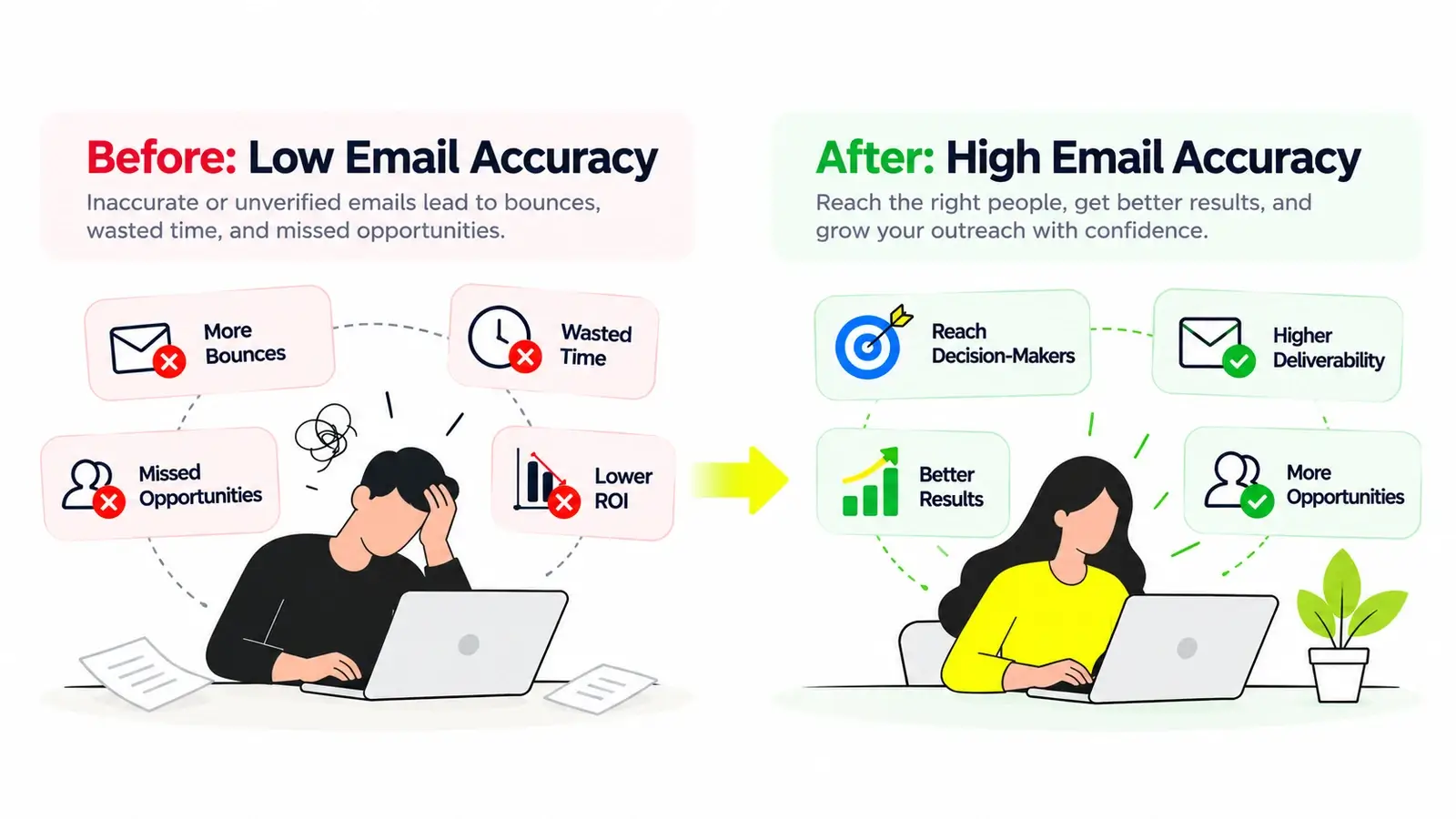
A single incorrect address may seem insignificant. Across thousands of prospects, however, poor email data can lead to unnecessary bounces, wasted prospecting efforts, damaged sender reputation, and missed opportunities.
For B2B sales and growth teams, email accuracy is not simply a technical detail. It is a fundamental part of building a reliable prospecting process.
But what makes a business email address accurate? How do verification systems determine whether an address exists? And why do some emails still bounce even after being marked as valid?
This guide explains how email accuracy works, where traditional verification falls short, and how to build a more dependable B2B contact database for cold outreach.
Key Takeaways
Email accuracy measures how reliably email data represents real, usable addresses. It is related to—but different from—email deliverability.
Traditional verification checks syntax, domains, mail servers, and SMTP responses, but cannot guarantee delivery.
Catch-all domains make verification more difficult because servers may accept addresses without confirming individual mailboxes.
Accurate contact data, continuous list maintenance, and responsible sending practices work together to reduce avoidable bounces.
Modern B2B data platforms such as Kitmind help teams discover prospects and obtain verified business emails, including addresses associated with catch-all domains.
What Is Email Accuracy?
Email accuracy describes how closely an email dataset reflects addresses that are correctly recorded, associated with the intended contacts, and capable of receiving messages.
For B2B prospecting, an accurate business email should ideally satisfy three conditions:
- Correct address: The email is properly formatted and associated with the intended professional.
- Valid destination: The domain and receiving infrastructure are configured to handle email, and available evidence supports the address being deliverable.
- Current information: The address has not become obsolete because of a job change, mailbox removal, domain migration, or organizational restructuring.
These conditions are related, but they are not identical.
An address can be technically valid while belonging to the wrong person. Likewise, an address may belong to the correct contact but no longer accept mail.
This is why accurate prospecting data requires more than checking whether a string contains an @ symbol.
Email Accuracy vs. Email Verification vs. Deliverability
These terms are frequently used interchangeably, but they describe different concepts.
Concept | What It Means | Main Question |
|---|---|---|
Email accuracy | The correctness and reliability of email data | Is this the right, current email for the intended contact? |
Email verification | Evaluating evidence that an address is likely to receive email | Does available technical evidence support this address being valid? |
Email deliverability | The ability of a sent message to reach the receiving system or inbox | Will this message be accepted and reach its destination? |
Email verification contributes to accuracy, but it does not establish every aspect of contact identity or guarantee inbox placement.
The practical goal is not merely to collect valid-looking addresses. It is to reach the right people through reliable business contact information.
Why Email Accuracy Matters for Cold Outreach
Email accuracy affects more than bounce rates. It influences the efficiency of the entire prospecting workflow.
1 Reduce Avoidable Email Bounces
A hard bounce generally indicates a permanent delivery failure, such as an address that does not exist. Soft bounces are typically associated with temporary delivery problems, although providers may classify failures differently.
Repeatedly sending messages to nonexistent addresses wastes resources and can contribute to negative reputation signals.
Accurate, current email data helps reduce one avoidable source of delivery failure. It does not eliminate bounces caused by server policies, filtering, temporary outages, or sender-side issues.
2 Protect Sender Reputation
Mailbox providers evaluate multiple signals when deciding whether to accept or filter incoming messages.
These may include authentication, sending patterns, spam complaints, domain or IP reputation, and recipient engagement signals.
Poor-quality lists can increase failed delivery attempts and contribute to broader sending problems. Verification should therefore be part of a larger sending-quality strategy—not treated as a substitute for proper email authentication and responsible outreach.
3 Improve Prospecting Efficiency
Consider a sales team that researches 2,000 target contacts.
If 15% of those records contain unusable addresses, 300 prospects cannot be reached through the intended email channel without additional research or correction.
That represents more than wasted sending capacity. It also means time spent researching, segmenting, and personalizing records that cannot support the planned outreach.
Illustrative example only; the percentage above is not an industry benchmark.
Better email data allows teams to spend more time on relevant prospects and less time correcting contact information.
4 Improve the Quality of Sales Measurement
Inaccurate email records can distort outreach performance analysis.
When a significant share of a list cannot receive messages, campaign-level metrics may obscure whether the real problem is audience targeting, messaging, or data quality.
Teams should separate address-level delivery failures from messaging performance when evaluating their prospecting process.
The business value of email accuracy is straightforward: fewer preventable data problems and more opportunities to reach the intended buyers.
How Email Verification Actually Works
Email verification is not a single test. Most systems combine several checks to evaluate whether an address is likely to be usable.
The exact methods vary by provider, and some receiving servers deliberately limit the information they reveal.
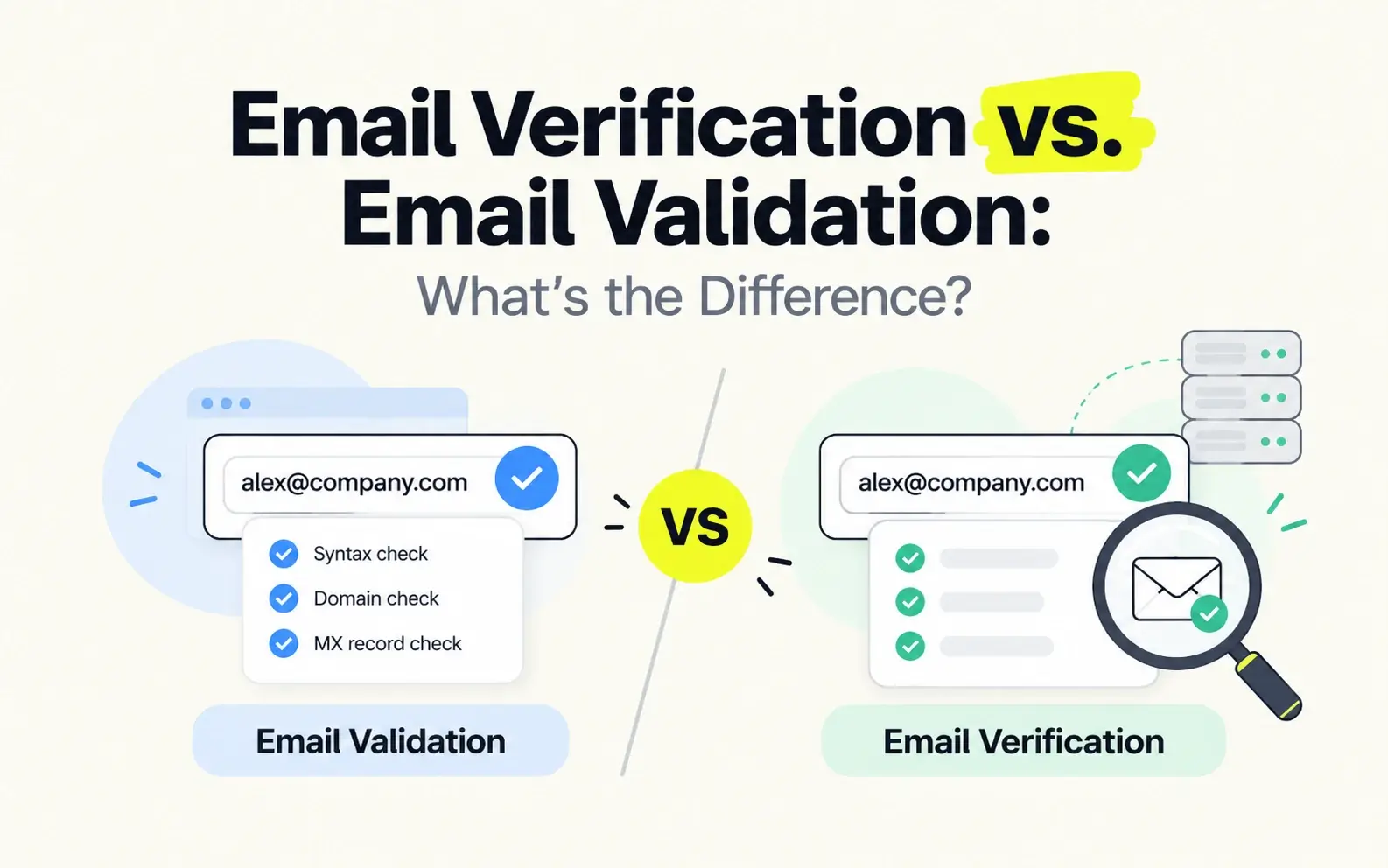
Step 1: Syntax Validation
The first step checks whether an address follows an acceptable email format.
For example:
alex@company.com— structurally plausiblealex.company.com— missing the@separatoralex@— missing a complete domain
Syntax validation catches obvious formatting problems, but it cannot determine whether a mailbox exists.
Step 2: Domain and DNS Checks
Next, a verification system examines the domain.
It may check whether the domain resolves and whether relevant DNS records provide information about email handling.
A nonexistent domain is a strong indication that the address cannot receive email through normal delivery.
However, a working website is not proof that a domain has functioning email infrastructure.
Step 3: MX Record and Mail Routing Checks
Mail Exchanger (MX) records identify mail servers responsible for receiving email for a domain.
Verification systems often inspect MX records to understand where email should be routed.
An important technical distinction: a domain without explicit MX records is not automatically undeliverable, because SMTP supports fallback behavior under certain conditions.
A robust verification process must account for mail-routing rules rather than treating every missing MX record as an immediate failure.
Step 4: SMTP-Level Evaluation
SMTP is the protocol used to transfer email between mail servers.
Some verification systems attempt to evaluate how a receiving server responds to a proposed recipient address without sending a normal outreach message.
Possible signals include recipient acceptance, rejection, temporary errors, connection restrictions, and other server responses.
But SMTP responses have limitations.
A server may accept a recipient during the SMTP conversation and later reject or discard the message. Other servers intentionally avoid revealing whether individual mailboxes exist.
Therefore, an SMTP acceptance response is not definitive proof that the mailbox is real.
Step 5: Risk Assessment and Classification
Modern verification systems may combine multiple signals to estimate email address validity and risk.
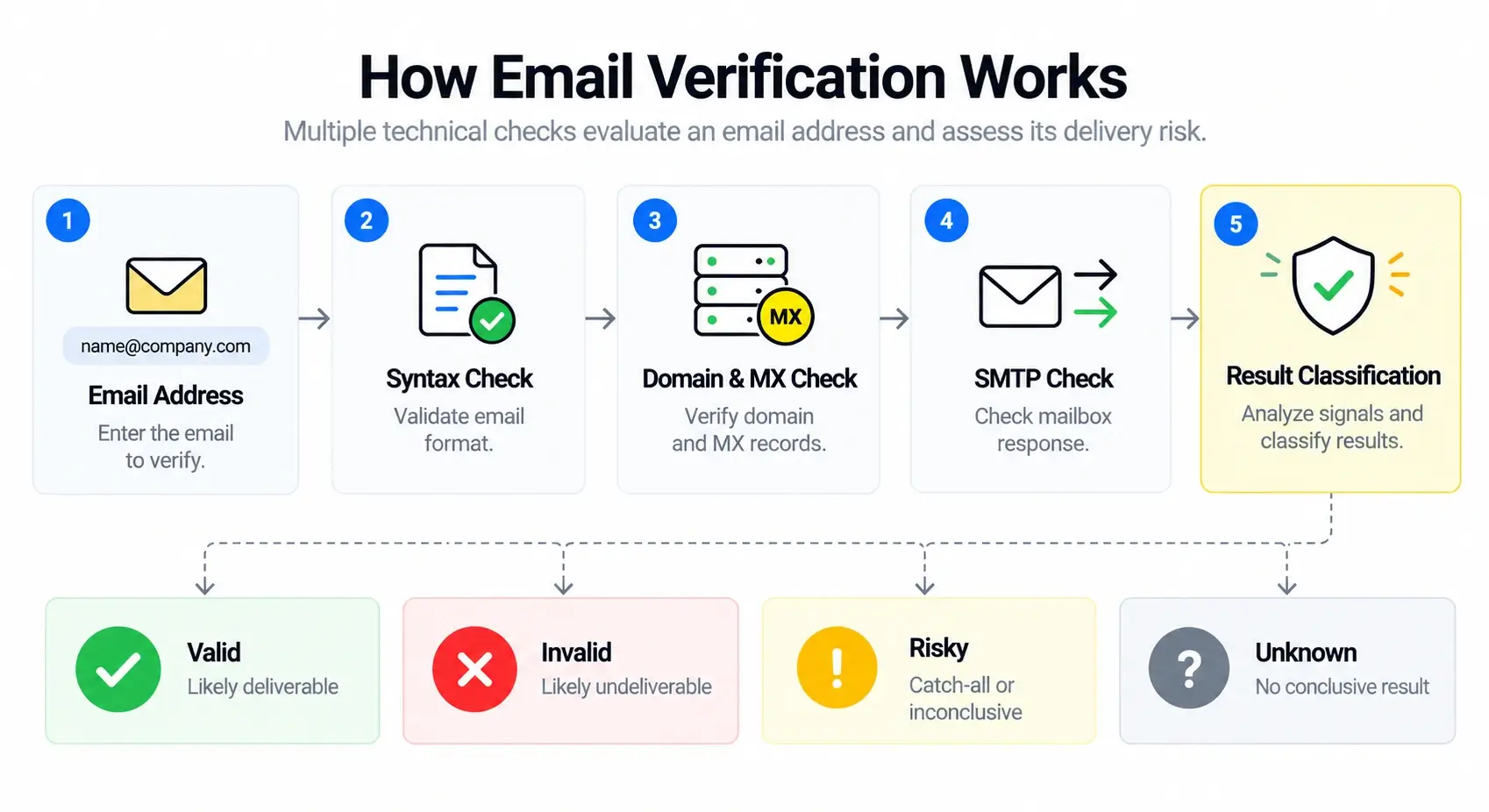
Depending on the provider, results may include:
Status | General Meaning | Recommended Interpretation |
|---|---|---|
Valid / Deliverable | Evidence supports successful delivery | Lower apparent address risk; not a delivery guarantee |
Invalid / Undeliverable | Evidence indicates the address is unusable | Correct or exclude the record |
Risky / Catch-all | Recipient-level acceptance may be inconclusive | Evaluate additional evidence |
Unknown | Insufficient evidence to classify | Retry or investigate |
Different tools use different labels and thresholds. Teams should understand how a provider defines each result before making decisions.
Why Verified Emails Can Still Bounce
One of the most common misunderstandings in email prospecting is that a verified address should never bounce.
Verification provides a point-in-time assessment based on available evidence. Delivery happens later, under potentially different conditions.
Several factors can cause an address to fail even after verification.
The Mailbox Has Changed
Employees change jobs, organizations rename domains, and IT teams remove or disable accounts.
An address verified last month may no longer be usable today.
This is especially relevant for contact databases that are exported and reused over long periods.
The Receiving Server Changes Its Behavior
Email infrastructure can behave differently depending on server load, connection history, anti-abuse policies, and the identity of the sender.
A server that accepts a verification probe may reject a later message, while another server may refuse verification attempts but accept legitimate email.
The Domain Uses Catch-all Handling
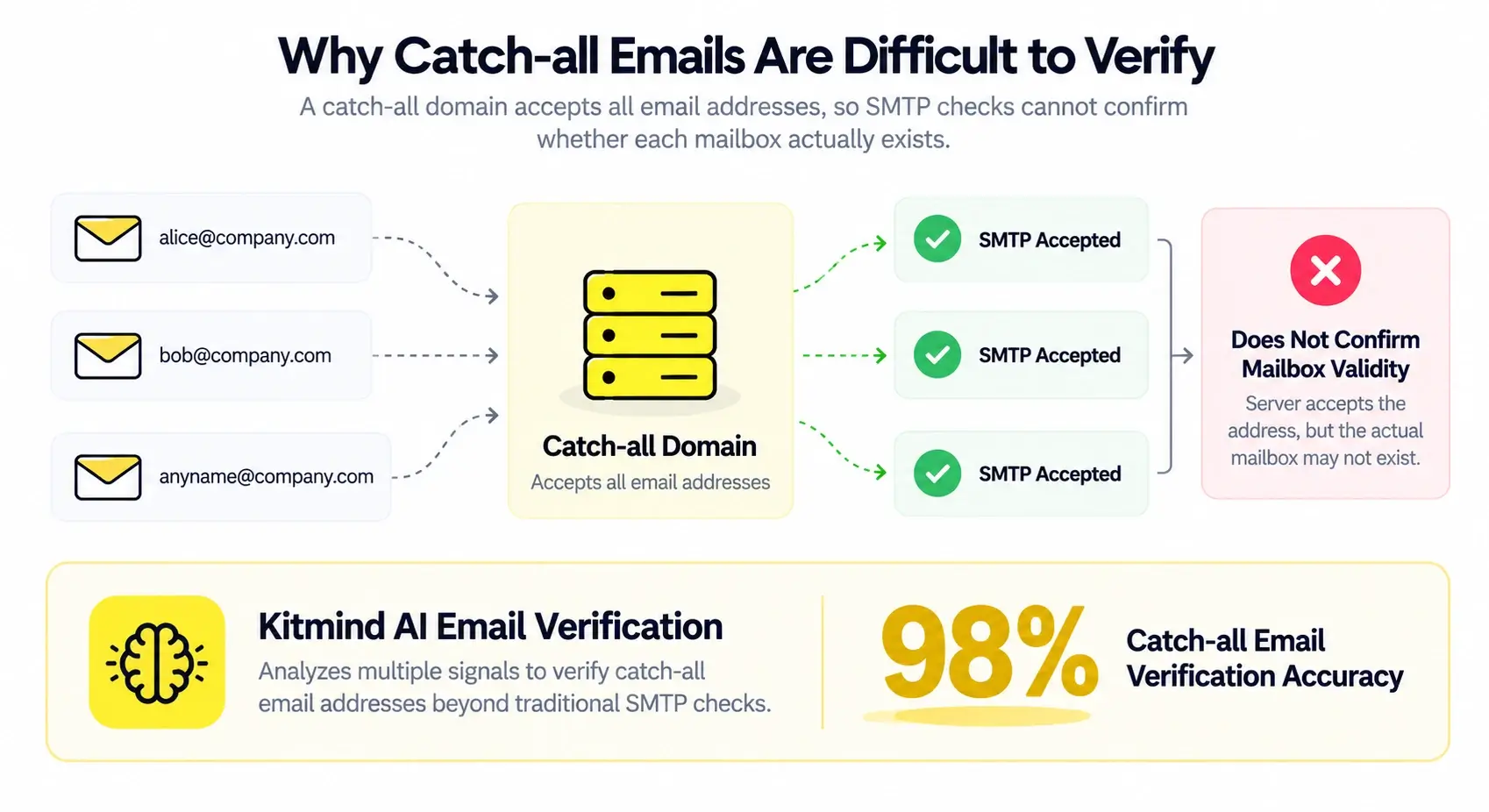
A catch-all configuration can make nonexistent recipients appear acceptable during an SMTP-level check.
This is one of the most important limitations of relying only on server acceptance.
Sender-Side Problems Prevent Delivery
Even a real, active mailbox may not receive a message when the sender has authentication problems, poor reputation, policy violations, or other delivery issues.
SPF, DKIM, and DMARC configuration, sending behavior, and message content all matter.
For this reason, teams should never interpret a high email verification accuracy rate as a guarantee of the same inbox placement or campaign delivery rate.
The Catch-all Email Challenge
Catch-all email domains are among the most difficult cases in business email verification.
A catch-all configuration allows a domain to accept messages addressed to recipients that may not correspond to individually identifiable mailboxes.
For example, suppose a company uses the domain example.com.
A receiving server might accept:
sarah@example.comsales@example.comrandomname123@example.com
That behavior does not prove all three addresses belong to real, active mailboxes.
The server may route messages to a general mailbox, apply filtering after acceptance, or handle unknown recipients through another internal policy.
Why Traditional Verification Struggles
Some traditional verification approaches rely heavily on SMTP recipient responses.
For domains that distinguish valid and invalid recipients during SMTP, these responses can provide useful evidence.
Catch-all configurations weaken that signal because different recipient addresses may receive similar acceptance responses.
The result is uncertainty: a tool may classify the address as Catch-all, Risky, or Unknown rather than confidently determining whether the intended mailbox exists.
Why This Matters in B2B Prospecting
Sales teams frequently encounter companies whose mail infrastructure limits recipient-level verification.
Automatically discarding every catch-all address can remove potentially valuable contacts from a prospect list.
On the other hand, assuming every accepted address is valid can create avoidable delivery risk.
Neither extreme is a reliable strategy.
Can Catch-all Emails Be Verified?
Catch-all verification is not necessarily a binary problem.
More advanced approaches may use additional evidence, including domain behavior, known address patterns, historical observations, contact-to-company relationships, and other risk signals.
These signals can improve confidence in particular addresses, but they do not remove every source of uncertainty.
The key is whether an email verification provider can accurately verify catch-all email addresses beyond conventional SMTP limitations—and demonstrate that accuracy through reliable testing.
Kitmind uses advanced AI-powered email verification algorithms to verify business email addresses, including catch-all emails that conventional SMTP-based methods struggle to validate. Kitmind achieves 98% catch-all email verification accuracy, helping B2B teams identify more verified business contacts.
The 98% figure represents catch-all email verification accuracy, not a guaranteed email delivery or inbox placement rate.
For a deeper explanation of catch-all domains, SMTP limitations, and AI-powered verification, read our complete guide to catch-all email verification.
How to Improve Email Accuracy: A Practical B2B Checklist
Email accuracy improves when prospecting teams treat contact data as an ongoing process rather than a one-time purchase or export.
The following workflow can help reduce avoidable errors.
Start with a Clearly Defined ICP
Before collecting addresses, define which companies and contacts matter.
Useful targeting criteria may include industry, company size, geography, business model, and relevant job functions.
For contact selection, distinguish the decision-maker from other members of the buying process.
A verified email is not useful if it belongs to someone who has no relevance to your offering.
Use Reliable Business Contact Sources
Prioritize data sources that provide identifiable company and contact relationships, clear email status information, and a meaningful process for maintaining accuracy.
Avoid assuming that the largest contact database automatically provides the best data for your target market.
Evaluate actual coverage and accuracy within your ICP.
Interpret Verification Results Correctly
Traditional email verification tools may classify catch-all addresses as Risky or Unknown when SMTP checks cannot confirm mailbox validity.
Use advanced AI-powered email verification to verify these difficult addresses rather than automatically excluding them.
When using Kitmind Prospector, select Email Status → Verified to find contacts with verified valid business email addresses, including verified catch-all contacts.
Keep Lists Current
Contact data decays as people change employers, roles, and email systems.
Refresh older lists before reusing them, especially after a long period without engagement.
Remove records known to be permanently undeliverable and investigate repeated failures.
Preserve Useful Data Context
Maintain the contact's name, company, role, domain, source, and relevant verification information when available.
This helps teams identify mismatches, avoid duplicate records, and understand why a contact was included.
Good data organization supports both accurate outreach and better CRM management.
Monitor Actual Sending Outcomes
Track hard bounces, temporary failures, complaints, and other relevant signals separately.
When problems increase, investigate the affected domains, data sources, and sending infrastructure rather than assuming a single cause.
Verification quality should be evaluated alongside real delivery feedback, with privacy and compliance considerations respected.
Follow Responsible Outreach Practices
Accurate email data does not make every outreach campaign appropriate.
Use relevant targeting, honest messaging, applicable consent or other lawful grounds where required, and functioning opt-out mechanisms.
Comply with applicable laws and provider policies in the markets where you operate.
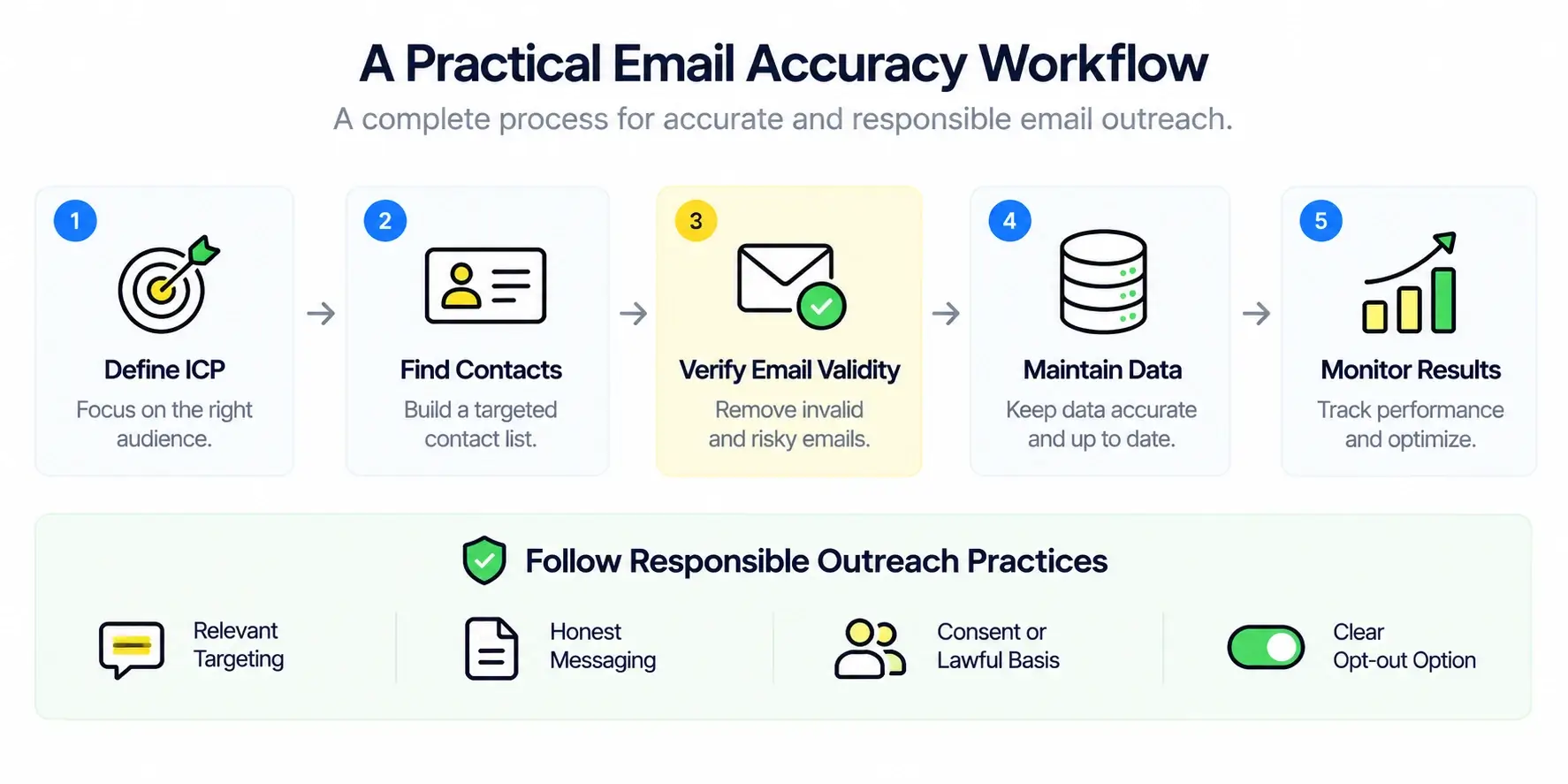
A strong email accuracy process combines better prospect selection, reliable contact data, appropriate verification, ongoing maintenance, and responsible sending.
How Kitmind Helps Teams Find More Accurate Business Emails
For sales and GTM teams, improving email accuracy should begin before contacts enter an outreach workflow.
Kitmind is a B2B prospecting and contact data platform designed to help teams discover relevant companies, identify professional contacts, and obtain verified business email addresses.
Rather than requiring users to assemble information from disconnected sources, Kitmind brings company discovery and contact prospecting into a more connected workflow.
1. Discover Relevant Companies
Kitmind Discover helps teams identify businesses that match their target-market research and prospecting criteria.
This supports the first step of data quality: finding the right accounts before collecting contacts.
2. Find Contacts with Verified Work Emails
Kitmind Prospector helps sales and GTM teams discover professionals at target companies and find their verified business email addresses.
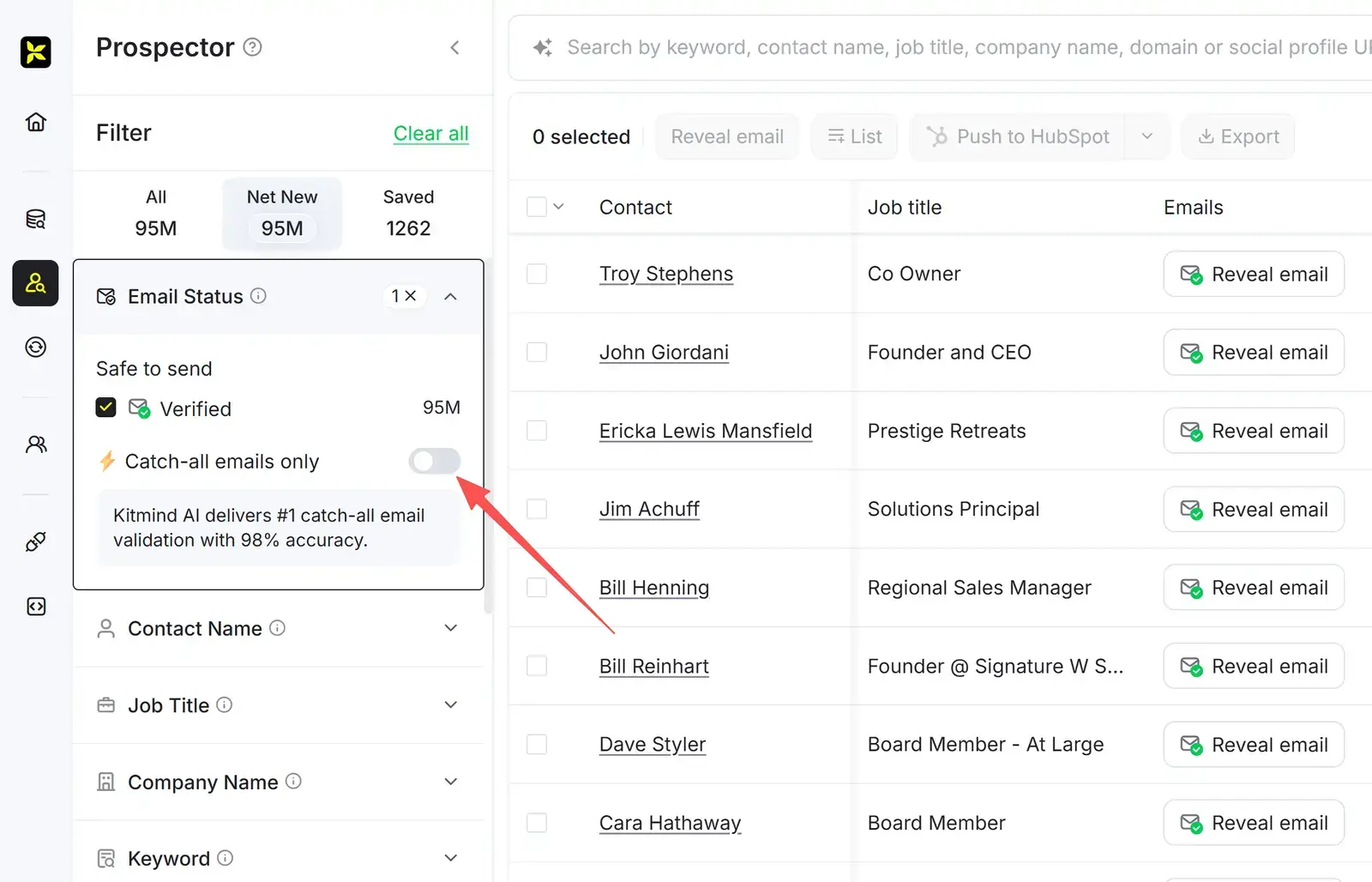
Simply apply the Email Status → Verified filter to discover contacts with valid business emails. To specifically find verified catch-all contacts, enable the Catch-all emails only filter.
Kitmind provides access to a global B2B contact database with verified business email addresses, helping sales teams discover relevant decision-makers across industries and markets.
Powered by advanced AI email verification technology, Kitmind achieves 98% catch-all email verification accuracy, including cases that conventional SMTP-based methods may classify as Risky or Unknown.
Business Email Accuracy Benchmark: Kitmind vs. Six B2B Data Providers
How much does business email accuracy vary across B2B prospecting platforms?
Kitmind conducted an internal benchmark involving a randomly selected sample of 1,000 verified contact email addresses on each platform, under the same filtering conditions. Each sample included both catch-all and non-catch-all emails (catch-all emails accounted for approximately 36–40%). Email accuracy was measured using the same AI-powered verification methodology across all seven platforms to support a consistent comparison.
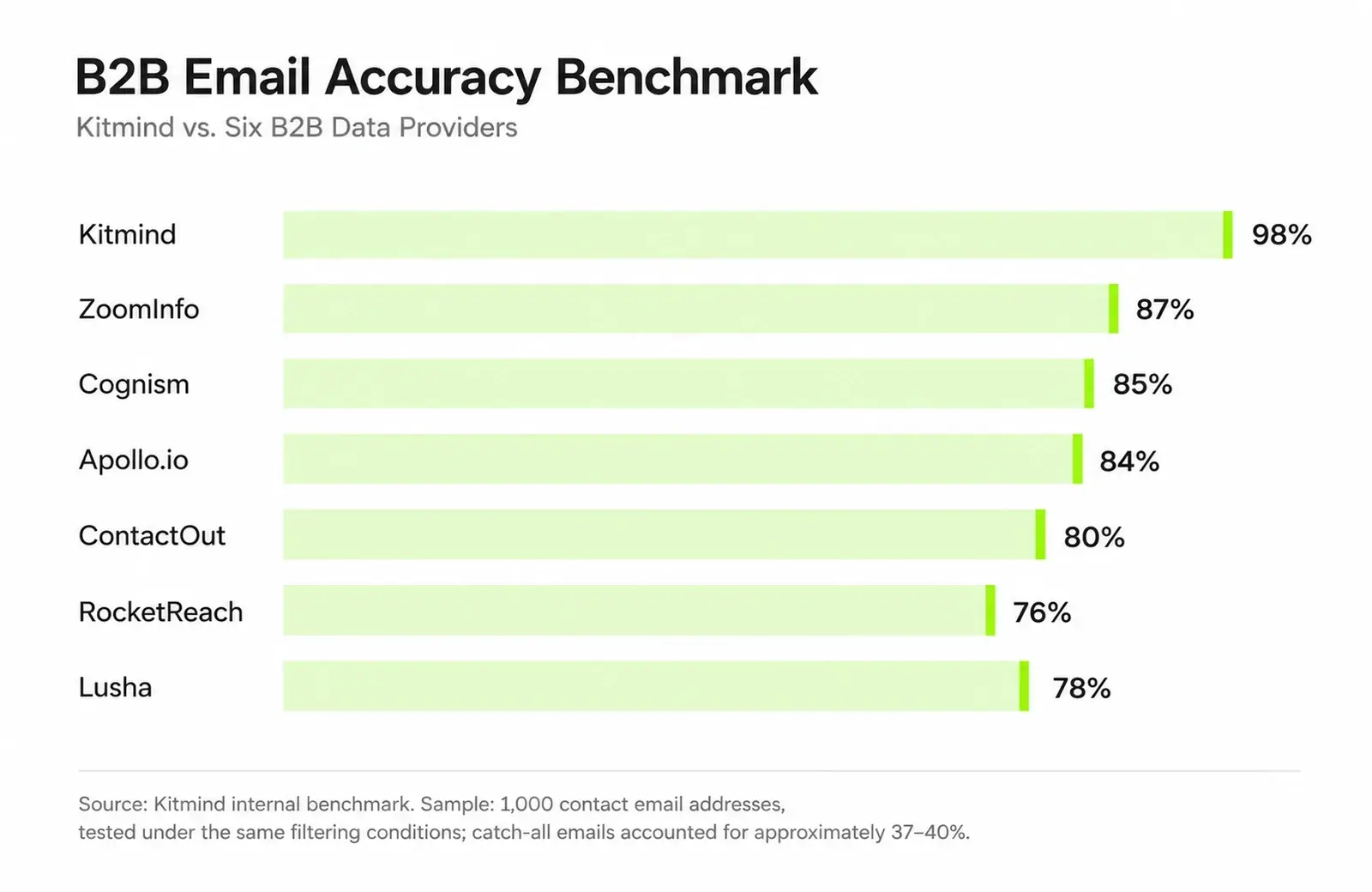
Provider | Email Accuracy |
|---|---|
Kitmind | 98% |
ZoomInfo | 87% |
Cognism | 85% |
Apollo.io | 84% |
ContactOut | 80% |
Lusha | 78% |
RocketReach | 76% |
Kitmind achieved the highest reported accuracy in this test at 98%, outperforming the next-highest provider, ZoomInfo, by 11 percentage points.
Across the six competing platforms, the unweighted average accuracy was approximately 81.7%, compared with Kitmind's 98%.
Under different filtering conditions or across different market segments, email accuracy may vary to some extent. These benchmark results highlight the importance of reliable email verification in B2B prospecting.
Verification performance across both catch-all and non-catch-all addresses can significantly affect the number of usable contacts available for outreach.
Kitmind combines AI-powered email verification with global contact discovery to help teams build more reliable prospecting lists.
3. Improving Catch-all Contact Coverage
Catch-all configurations create a challenge for many conventional verification methods.
Kitmind's AI-powered email verification technology verifies catch-all email addresses beyond the limitations of conventional SMTP checks.
With 98% catch-all verification accuracy, Kitmind helps businesses identify valid email addresses that traditional tools may leave classified as Risky or Unknown.
In Kitmind Prospector, users can filter by Verified and enable Catch-all emails only to discover verified catch-all contacts directly, expanding prospecting opportunities without relying on unverified email lists.
4. Organizing Prospecting Data
Kitmind also supports contact and company lead management, CSV enrichment, and integrations with Salesforce, HubSpot, Pipedrive, Zoho CRM, and Mailchimp.
These capabilities help teams move from discovering prospects to maintaining more organized contact data.
The value is not that email accuracy alone guarantees campaign success. It is that sales teams can begin with more reliable business contact information and build a better prospecting workflow around it.
Frequently Asked Questions
What is a good email accuracy rate for cold outreach?
There is no universal accuracy rate that guarantees successful delivery. Evaluate a provider's accuracy using a clearly defined sample, a transparent testing method, and outcomes relevant to your target audience. Also monitor your own sending results.
Does a verified email guarantee delivery?
No. Verification evaluates available evidence about an address. Delivery also depends on the sender, receiving server, authentication, filtering policies, and conditions at the time of sending.
Are catch-all email addresses always risky?
Not necessarily. Catch-all handling makes mailbox existence harder to determine from SMTP acceptance alone. Some addresses may be legitimate, while others may not correspond to active recipients. Additional evidence is needed.
How often should B2B email lists be updated?
There is no single interval that works for every organization. Refresh lists based on data age, contact turnover, campaign frequency, and observed failures. Older or high-risk records deserve closer review.
What is a good email accuracy rate for cold outreach?
There is no universal accuracy rate that guarantees successful delivery. Evaluate a provider's accuracy using a clearly defined sample, a transparent testing method, and outcomes relevant to your target audience. Also monitor your own sending results.
Does a verified email guarantee delivery?
No. Verification evaluates available evidence about an address. Delivery also depends on the sender, receiving server, authentication, filtering policies, and conditions at the time of sending.
Are catch-all email addresses always risky?
Not necessarily. Catch-all handling makes mailbox existence harder to determine from SMTP acceptance alone. Some addresses may be legitimate, while others may not correspond to active recipients. Additional evidence is needed.
How often should B2B email lists be updated?
There is no single interval that works for every organization. Refresh lists based on data age, contact turnover, campaign frequency, and observed failures. Older or high-risk records deserve closer review.
How does Kitmind improve business email accuracy?
Kitmind provides verified business email contacts and uses enhanced assessment methods for difficult addresses, including catch-all domains. It reports 98% business email accuracy under its internal testing process, although individual outcomes can vary.