Your email list passes validation, but your campaigns still get bounces. Why?
Because an email address can have the correct format without belonging to a working mailbox.
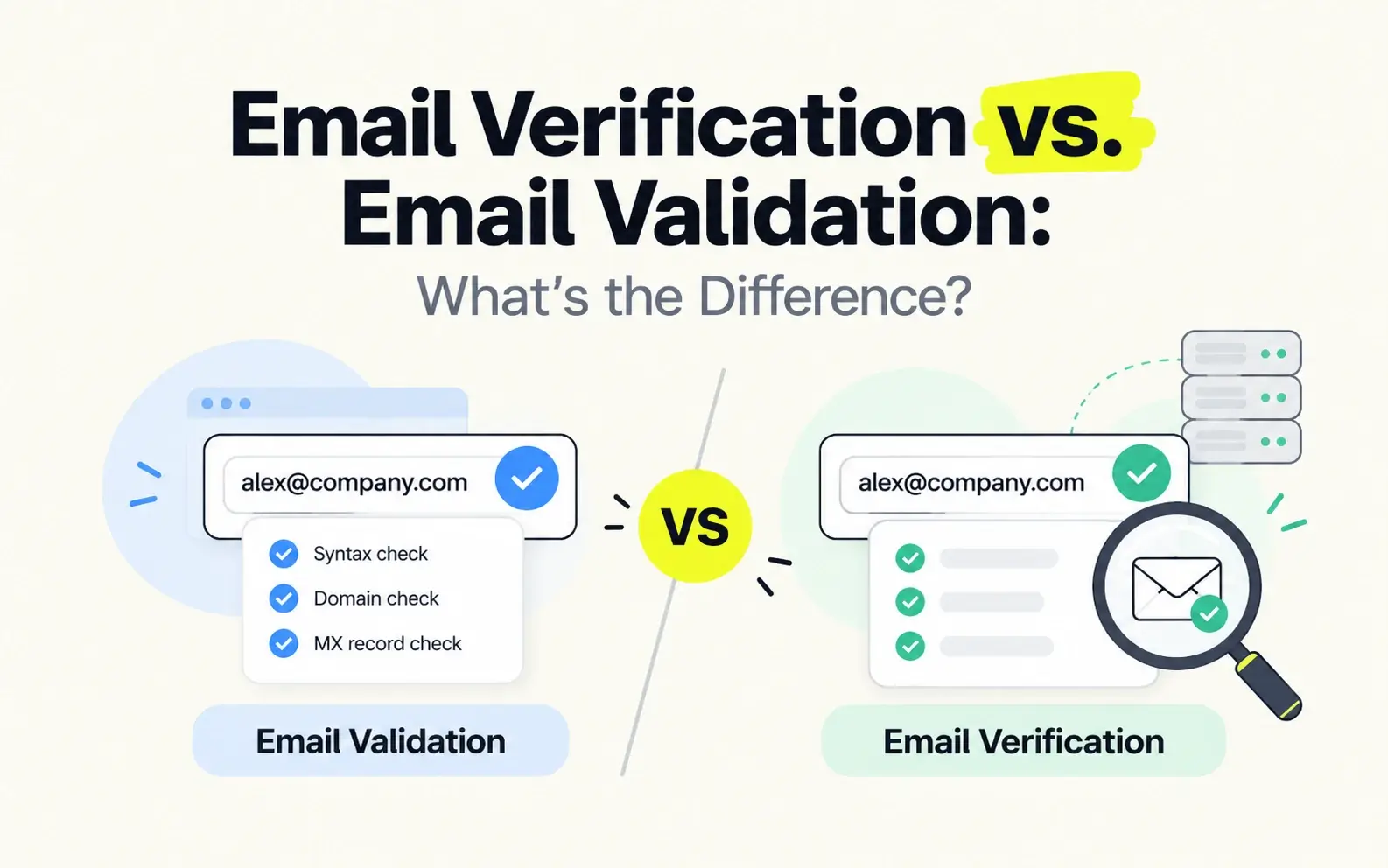
Email validation typically checks whether an address is correctly structured and technically plausible. Email verification goes further to assess whether the address is likely to receive mail. However, providers sometimes use these terms interchangeably.
This guide explains the differences, what each process can actually check, and how to choose the right approach for your outreach.
Key Takeaways
Email validation typically checks syntax and basic domain requirements, while email verification may include deeper mailbox-level checks.
The terms are often used interchangeably, so a tool's actual capabilities matter more than its name.
A correctly formatted email address isn't necessarily a working mailbox.
Catch-all domains can make conventional mailbox verification inconclusive.
For B2B outreach, prioritize verification quality and relevant contacts—not just addresses that pass format checks.
What Is Email Validation?
Email validation is the process of checking whether an email address meets certain formatting and technical requirements.
In its basic form, email validation determines whether an address is correctly structured and whether its domain appears capable of receiving email.
For example, consider these addresses:
john.smith@company.com— A correctly formatted business email address.- john.smithcompany.com — An incorrectly formatted address because it lacks the
@symbol. john@nonexistent-example-domain.com— An address that may pass a basic syntax check but fail a domain check if the domain does not exist.
Depending on the tool, email validation may include:
- Syntax validation: Checking the email address format.
- Domain validation: Checking whether the domain exists.
- MX record validation: Checking whether the domain has mail exchange records associated with receiving email.
These checks can help identify obvious errors before an email is submitted, saved to a database, or used in a campaign.
However, passing email validation does not necessarily mean the recipient's mailbox exists or can receive messages.
For instance, john.smith@company.com might have a valid format and a working domain, even if John Smith no longer works there.
This is why basic email validation alone may not be sufficient for B2B email outreach.
What Is Email Verification?
Email verification is the process of assessing whether an email address is valid and likely to accept incoming messages.
While basic validation focuses on structure and domain plausibility, deeper email verification may examine mail-server responses and additional signals to evaluate mailbox validity.
A typical email verification system may perform several checks:
- Syntax checks: Identify malformed addresses.
- Domain and MX checks: Assess whether the domain is configured to receive email.
- SMTP checks: Evaluate available responses from the receiving mail server.
- Mailbox-level assessment: Use server responses and other signals to estimate whether an address is valid.
- Catch-all assessment: Evaluate addresses associated with domains that accept mail for many or all recipient names.
Not every email verification provider performs all these checks, and some mail servers deliberately limit the information they reveal.
For example, a mail server may accept a recipient during an SMTP check without confirming that a specific mailbox exists.
That means verification is not always a simple yes-or-no technical test.
More advanced systems may combine multiple signals to improve their assessment, particularly when conventional SMTP checks are inconclusive.
For sales and marketing teams, the goal is to reduce uncertainty about email validity before outreach.
Still, even a verified business email address cannot guarantee that every future message will be delivered or placed in the recipient's inbox.
Email Verification vs. Email Validation: Key Differences
The main difference between email verification and email validation is usually the depth of the checks performed.
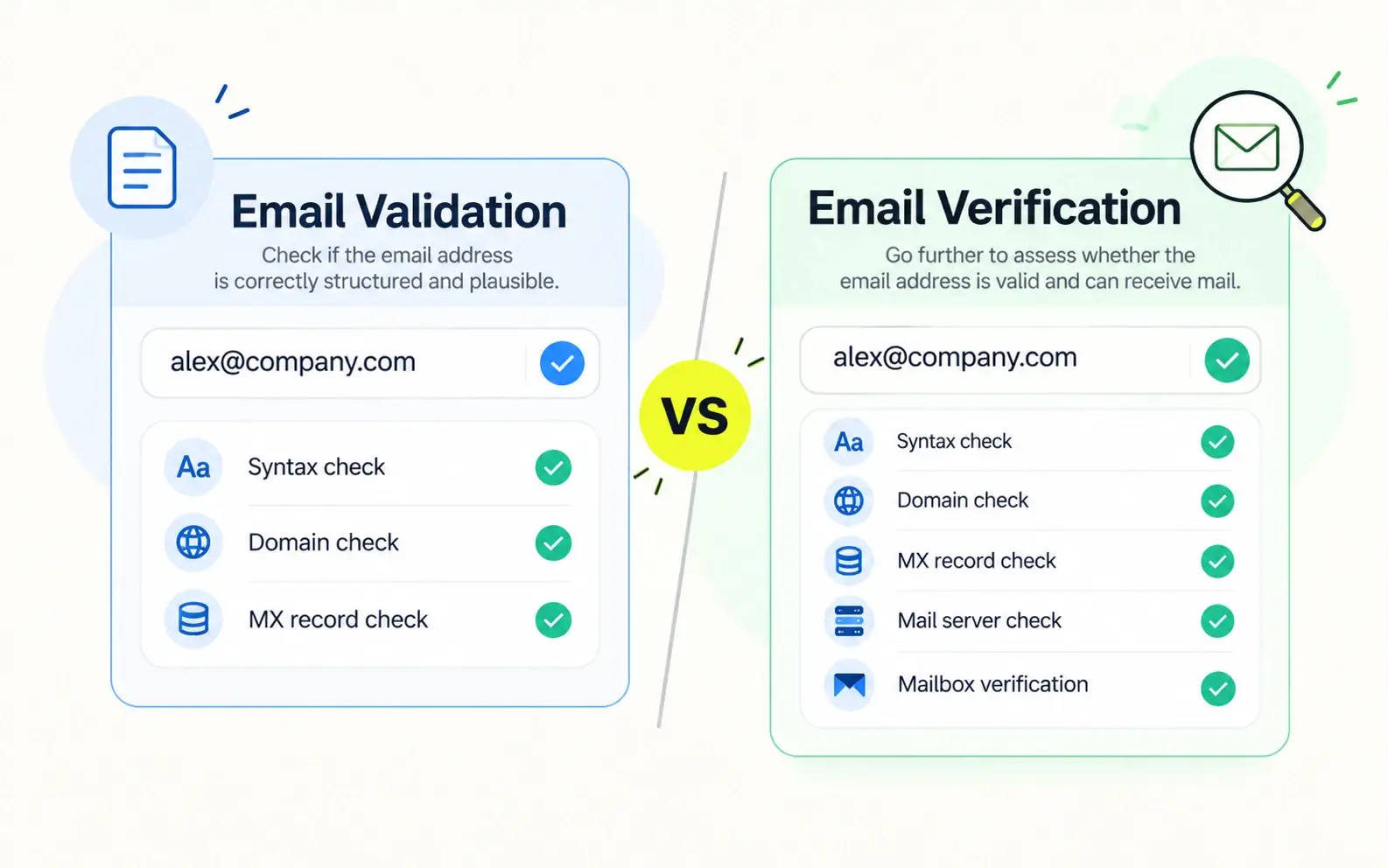
Email validation often focuses on whether an address is properly formed and technically plausible. Email verification may go further to assess whether the receiving mailbox is valid.
However, these are common industry distinctions—not universally standardized definitions. Some providers use both terms to describe the same service.
Email Validation vs. Email Verification Comparison
Comparison | Email Validation | Email Verification |
|---|---|---|
Primary goal | Check whether an address is correctly structured and technically plausible | Assess whether an email address is valid and likely to accept mail |
Syntax checks | Yes | Usually |
Domain checks | Often | Usually |
MX record checks | Often | Usually |
SMTP checks | Not always | Often |
Mailbox-level assessment | Not typically included in basic validation | May be performed when sufficient signals are available |
Catch-all handling | Usually limited in basic validation | Depends on the provider's technology |
Typical use cases | Signup forms, data entry, initial screening | Cold outreach, CRM cleanup, contact-list verification |
Guarantees email delivery | No | No |
The name of the tool matters less than the checks it performs.
For example, a provider may market its product as an email validation service while offering SMTP checks, mailbox assessment, and catch-all detection.
Another provider may call its product an email verifier even though it primarily checks syntax and domain configuration.
When comparing email validation and verification tools, examine their actual capabilities rather than relying on the product name alone.
Pay particular attention to how they handle invalid mailboxes, catch-all domains, inconclusive results, and verification accuracy.
How Email Validation and Verification Work
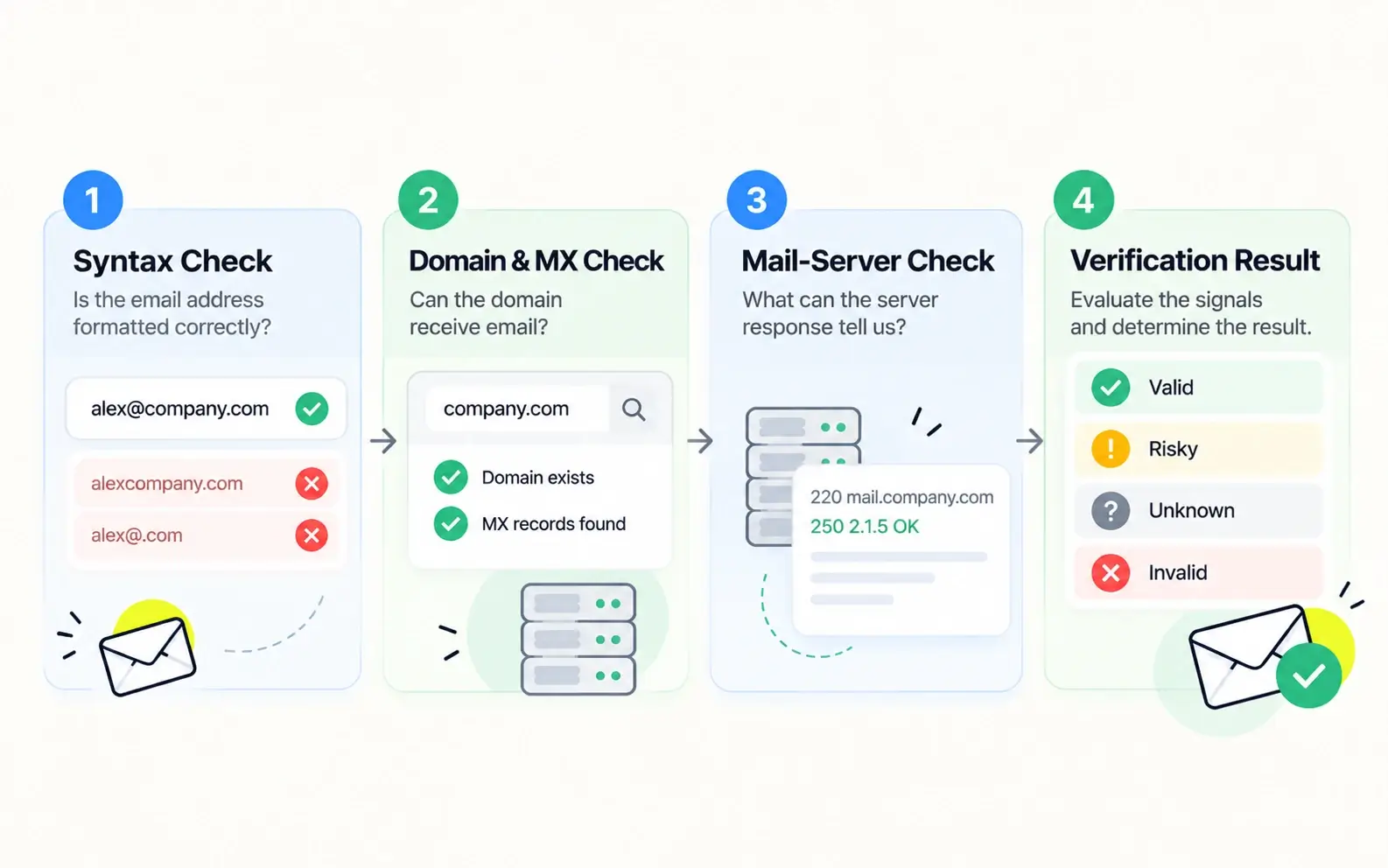
Although verification providers use different technologies, email checking can be understood through several common layers.
Step 1: Check Email Syntax
The first layer examines whether an email address follows an acceptable structure.
For example, alex@company.com has a conventional email format, while alexcompany.com is missing the @ symbol.
Syntax checks can identify formatting problems, but they cannot establish whether a mailbox exists.
Step 2: Check the Domain and Mail Configuration
The next layer examines the domain after the @ symbol.
Domain checks may determine whether the domain exists and whether its DNS configuration provides information about email handling.
MX records commonly identify the mail servers responsible for receiving messages for a domain. Some domains can also receive email through other permitted DNS configurations, so MX records are not the only possible indicator.
These checks help assess whether the domain can receive email, but they do not prove that a particular employee's mailbox exists.
Step 3: Assess Mail-Server and Mailbox Signals
Deeper verification may use SMTP interactions and other technical signals to evaluate the recipient address.
Depending on the receiving server's behavior, the result may indicate that an address is invalid, appears valid, or cannot be determined confidently.
Some mail servers reject unknown recipients, while others accept recipient checks without revealing mailbox validity.
This is one reason why SMTP verification alone cannot reliably determine the validity of every email address.
Step 4: Interpret the Verification Result
The final result depends on the provider's verification methods and classification system.
Some providers return categories such as Valid, Invalid, Risky, or Unknown. Others use different labels or confidence assessments.
The important question is what each result means and whether the provider has enough evidence to support it.
For a more detailed explanation of verification techniques, read our guide on how to verify business email addresses.
Why Catch-All Emails Make Verification More Complicated
One of the biggest challenges in email verification is the catch-all email domain.
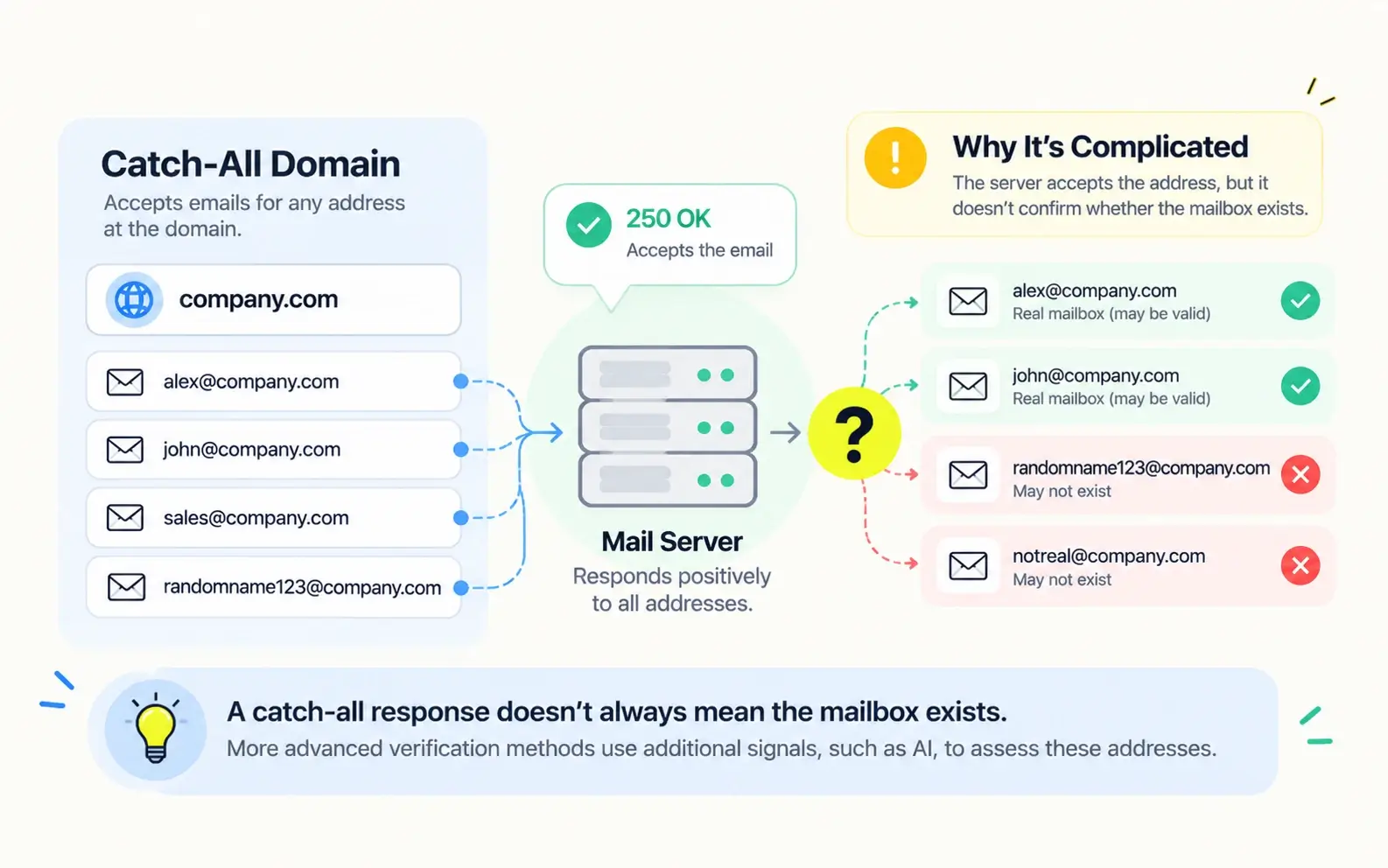
A catch-all domain is configured to accept email for a broad range of recipient addresses, including addresses that may not correspond to individual mailboxes.
For example, suppose a company uses company.com as a catch-all domain.
Its mail server might accept an SMTP recipient check for both:
alex@company.comrandomname123@company.com
Even if only the first address belongs to a real employee, the server's responses may not clearly distinguish between them.
This creates a problem for traditional verification methods.
A mail server accepting an address doesn't always prove that the mailbox exists.
As a result, some conventional email verification tools classify catch-all addresses as uncertain or risky rather than determining whether individual addresses are valid.
How AI-Powered Catch-All Verification Helps
More advanced verification systems can analyze additional signals beyond conventional SMTP responses to determine whether catch-all email addresses are valid.
Kitmind uses AI-powered email verification within its underlying contact data system, including technology designed to verify catch-all business email addresses that conventional methods struggle to classify.
Kitmind reports 98% accuracy for catch-all email verification. This figure refers specifically to the accuracy of its catch-all verification technology—not guaranteed email delivery or inbox placement.
In Kitmind Prospector, users can apply the Verified email status filter and enable Catch-all emails only to find contacts with valid catch-all business emails. In Kitmind Discover, users can filter companies associated with catch-all domains, explore their employees, and reveal available pre-verified business email addresses.
Because verification happens within Kitmind's underlying data system, users can access verified emails through the prospecting workflow without running a separate email verification step.
To understand the technology and its limitations in greater detail, explore our article on AI-powered catch-all email verification.
Email Validation vs. Verification: Which One Do You Need?
The right approach depends on how you plan to use the email addresses.
Basic email validation can be useful when your immediate goal is to catch formatting mistakes or screen data entered into a form.
Deeper email verification becomes more important when you need to evaluate existing contact lists or prepare business email addresses for outreach.
Common Use Cases
Use Case | Recommended Approach |
|---|---|
Website signup forms | Syntax validation, with additional checks where appropriate |
Newsletter subscriptions | Validation, suitable verification, and appropriate opt-in practices |
Cold email outreach | Deeper email verification before sending |
CRM data cleanup | Bulk email verification and ongoing data maintenance |
B2B lead generation | Relevant professional data combined with verified business emails |
For Website Forms
Start with syntax validation to identify obvious mistakes.
Additional domain checks can help reduce invalid submissions, but aggressive mailbox checks during signup may incorrectly reject legitimate addresses when servers do not provide conclusive responses.
For Cold Email Outreach
Prioritize verified email addresses rather than relying solely on formats or guessed email patterns.
Sending to outdated or invalid addresses can increase bounce rates and undermine your outreach efforts.
Verification can reduce avoidable problems, although deliverability also depends on sender reputation, authentication, message content, and recipient behavior.
For CRM and Contact Lists
For existing CRM and contact lists, email verification can help identify outdated or invalid addresses and support ongoing data maintenance.
When your goal is to complete missing business contact information, Kitmind CSV Enrichment provides a different but complementary workflow.
With People Enrichment, users can upload a CSV containing identifiers such as a person's name and company, LinkedIn profile URL, or work email. Kitmind matches the records against its contact database and allows users to enrich matched contacts with available verified business emails, professional details, and associated company information.
For company records, Company Enrichment supports free enrichment of matched company data.
This is a contact and company data enrichment workflow, rather than a standalone service for testing arbitrary email addresses.
For B2B Prospecting
Email validity is only one part of a useful prospect record.
You also need to identify the right company, find relevant decision-makers, and confirm that their professional information matches your target audience.
A verified email address has limited value if it belongs to someone who is not relevant to your campaign.
If your challenge is discovering the right contacts in the first place, see how to find verified business email addresses.
Ultimately, email validation and email verification are complementary, not necessarily competing, processes.
The best approach combines the checks appropriate for your use case.
How Kitmind Helps You Find Pre-Verified Business Emails
For B2B sales and marketing teams, understanding email verification is important—but finding the right people with reliable business email addresses is equally essential.
Kitmind combines global B2B prospecting with AI-powered email verification technology, helping users identify relevant companies, find decision-makers, and reveal pre-verified business email addresses without performing separate verification checks.
The platform provides access to 85M+ companies and 300M+ professional contact profiles, including 95M+ contacts with verified business emails. Kitmind reports 98%+ overall business email accuracy, although verification does not guarantee future email delivery or inbox placement.
Discover Companies and Their Verified Contacts
Kitmind Discover takes a company-first approach to B2B prospecting.
Users can identify target companies using advanced filters such as industry, location, employee count, revenue, company type, and other business attributes. Discover also supports finding companies with or without LinkedIn company pages.
After selecting a company, users can review its profile, explore employees, and filter contacts by job title, location, experience, and email status.
Available pre-verified business email addresses can then be revealed and saved or exported for outreach.
Discover also provides Public Emails collected from publicly available sources, including company websites. These addresses are displayed separately from verified employee contacts and can be accessed without consuming credits, subject to applicable plan limits.
Find Decision-Makers with Kitmind Prospector
Kitmind Prospector follows a contact-first approach, helping users identify professionals who match their ideal buyer personas.
Users can combine filters such as job title, department, seniority, location, company attributes, professional experience, and job-change signals to narrow their search.
The Email Status filter allows users to prioritize contacts with verified business email addresses. Users can also enable Catch-all emails only to find contacts with valid catch-all emails identified through Kitmind's underlying verification technology.
Once relevant contacts are identified, users can reveal available pre-verified business emails, organize prospects into lists, export contact data, or use supported integrations to move leads into their sales workflows.
Enrich Existing Contact Data with CSV Enrichment
For teams that already have contact lists, Kitmind CSV Enrichment provides a way to complete missing business contact information.
Users can upload a CSV containing contact identifiers, map the relevant columns, and match records against Kitmind's database.
With People Enrichment, matched contacts can be enriched with available verified business emails, professional details, and associated company information.
Company Enrichment separately supports free enrichment of company records.
Rather than functioning as a standalone bulk email verifier, CSV Enrichment helps teams improve the completeness and usefulness of their existing B2B data.
Find Business Emails While Browsing
The Kitmind Chrome Extension brings prospecting capabilities into the browser.
Users can discover relevant companies while searching on Google, explore company and employee information on websites, and reveal available business emails while browsing LinkedIn profiles.
The extension also supports lead-management actions in supported contexts, helping users save prospects and move contact information into their workflows.
Across these experiences, Kitmind's underlying verification technology supports access to pre-verified business email data, so users can focus on finding relevant prospects rather than manually verifying addresses one by one.
Frequently Asked Questions
Is email validation the same as email verification?
Not always. Email validation commonly refers to checking an address's format and basic technical requirements, while email verification may include deeper checks to assess mailbox validity. However, many providers use the terms interchangeably. The most reliable way to compare services is to examine which checks they actually perform.
Can an email pass validation but fail verification?
Yes. An email address can have the correct format and belong to a domain configured to receive mail, even if the specific mailbox does not exist. Basic validation may accept the address, while deeper verification may identify it as invalid or return an inconclusive result.
Does email verification guarantee delivery?
No. Email verification assesses validity using available technical and other signals, but it cannot guarantee future delivery or inbox placement. Sending reputation, authentication, spam filtering, server policies, and changes to the recipient's mailbox can all affect delivery.
Can email verification check catch-all addresses?
Yes, but the level of assessment depends on the verification provider. Conventional SMTP checks may struggle to distinguish valid mailboxes from nonexistent addresses on catch-all domains. Advanced systems, including AI-powered verification, may use additional signals to evaluate these addresses more effectively.
Should I validate or verify emails before cold outreach?
For cold outreach, deeper email verification is generally more useful than syntax validation alone. It can help identify invalid addresses and reduce avoidable bounces. However, verification should be combined with accurate contact information, relevant targeting, and responsible email-sending practices.
Conclusion
Email validation and email verification are closely related, but they may serve different purposes.
Validation commonly checks whether an address is correctly structured and technically plausible, while verification may go further to assess mailbox validity.
For B2B outreach, the important distinction is not what a tool calls its process, but how reliably it evaluates the email addresses you intend to use.
Combining relevant business contacts with effective email verification helps teams reduce uncertainty and build more dependable prospect lists.