Finding a business email address is only half the challenge. The other half is knowing whether that address actually works.
An email can look perfectly legitimate, belong to an active company domain, and even pass basic verification checks—yet still bounce when you send a message.
For sales professionals, marketers, and B2B prospecting teams, these uncertainties can lead to wasted outreach, unreliable contact lists, and unnecessary deliverability risks. Learn more about email accuracy for cold outreach.
So, how do you verify a business email address without sending a message? And how much confidence can different verification methods actually provide?
This guide breaks down seven common email verification methods, explains their technical limitations, and shows how to make better decisions when working with business contact data.
Key Takeaways
Email verification requires multiple checks. Syntax validation, DNS and MX records, SMTP responses, and additional verification signals work together to assess deliverability. No single method can guarantee successful email delivery.
Catch-all domains remain a major challenge. Traditional SMTP verification often cannot distinguish valid mailboxes from nonexistent addresses on catch-all servers, making accurate verification more difficult.
Kitmind uses AI to tackle catch-all verification. With AI-powered email verification technology and 98%+ catch-all verification accuracy, Kitmind helps identify verified business emails that traditional methods may struggle to assess.
Reliable B2B outreach requires more than valid emails. Kitmind combines verified business email data with company discovery and decision-maker identification, helping teams reach relevant prospects with greater confidence.
What Is Business Email Verification?
Business email verification is the process of evaluating whether an email address is properly formatted, associated with a legitimate mail domain, and likely to receive incoming messages.
Rather than relying on a single test, effective verification combines multiple checks to build a more reliable assessment.
For example, consider the address alex@company.com.
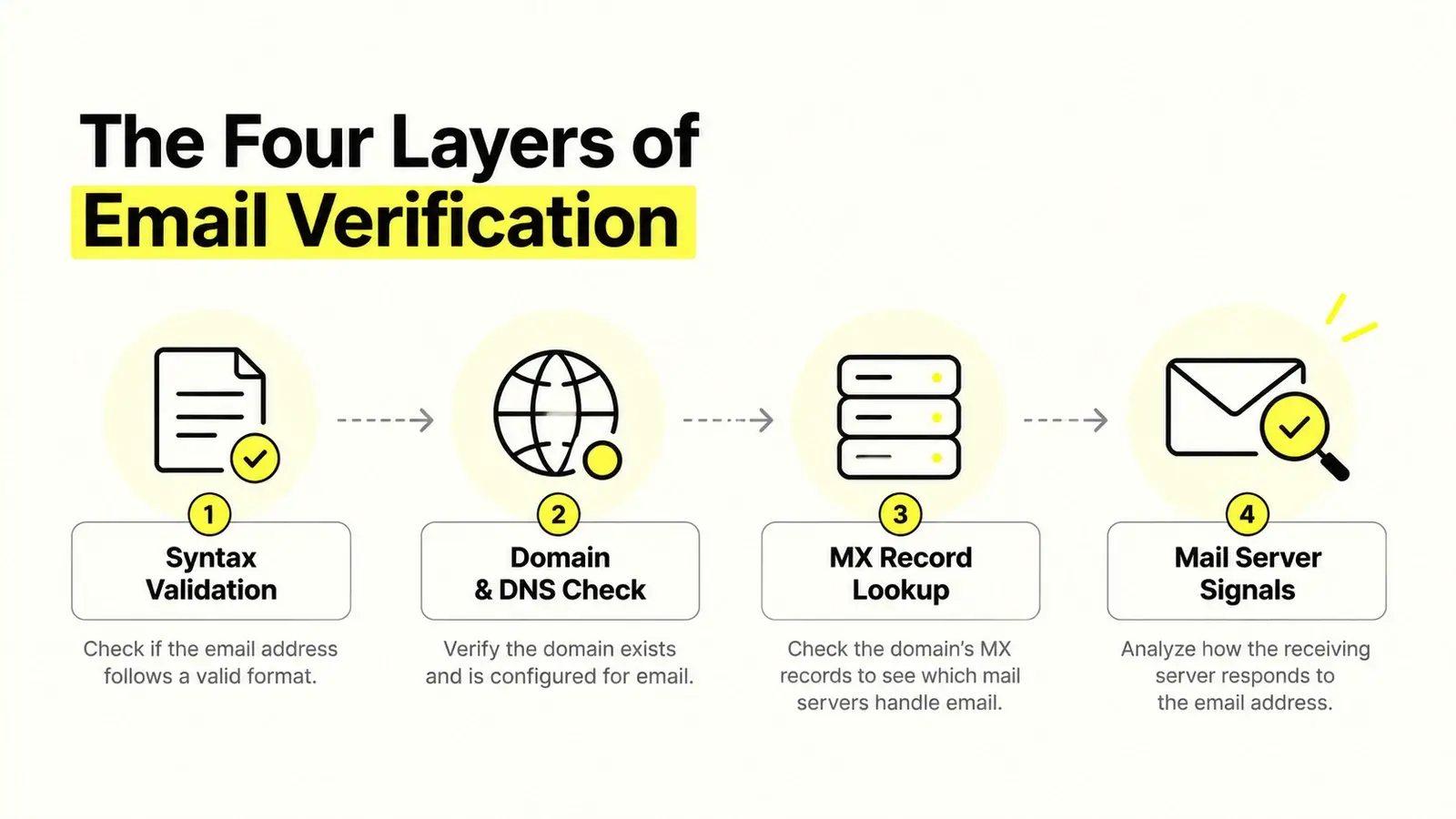
A verification process might examine:
- Email syntax: Does the address follow a valid email format?
- Domain configuration: Does company.com have the necessary DNS configuration to receive email?
- Mail server behavior: Does the receiving server provide useful signals about whether the mailbox exists?
- Additional verification signals: Are there other indicators that help assess the address when direct verification is inconclusive?
Each check answers a different question. Passing one does not guarantee passing the others.
Email Verification Is Not the Same as Contact Accuracy
An important distinction is often overlooked: an email address can be technically valid without belonging to the person you intend to contact.
Suppose sales@company.com is an active, deliverable mailbox. That does not mean it reaches the company's VP of Sales.
Similarly, an address associated with a former employee might still accept incoming messages through forwarding or mailbox retention.
For B2B prospecting, reliable contact data requires both email deliverability confidence and accurate person-to-company matching.
7 Methods to Verify Business Email Addresses
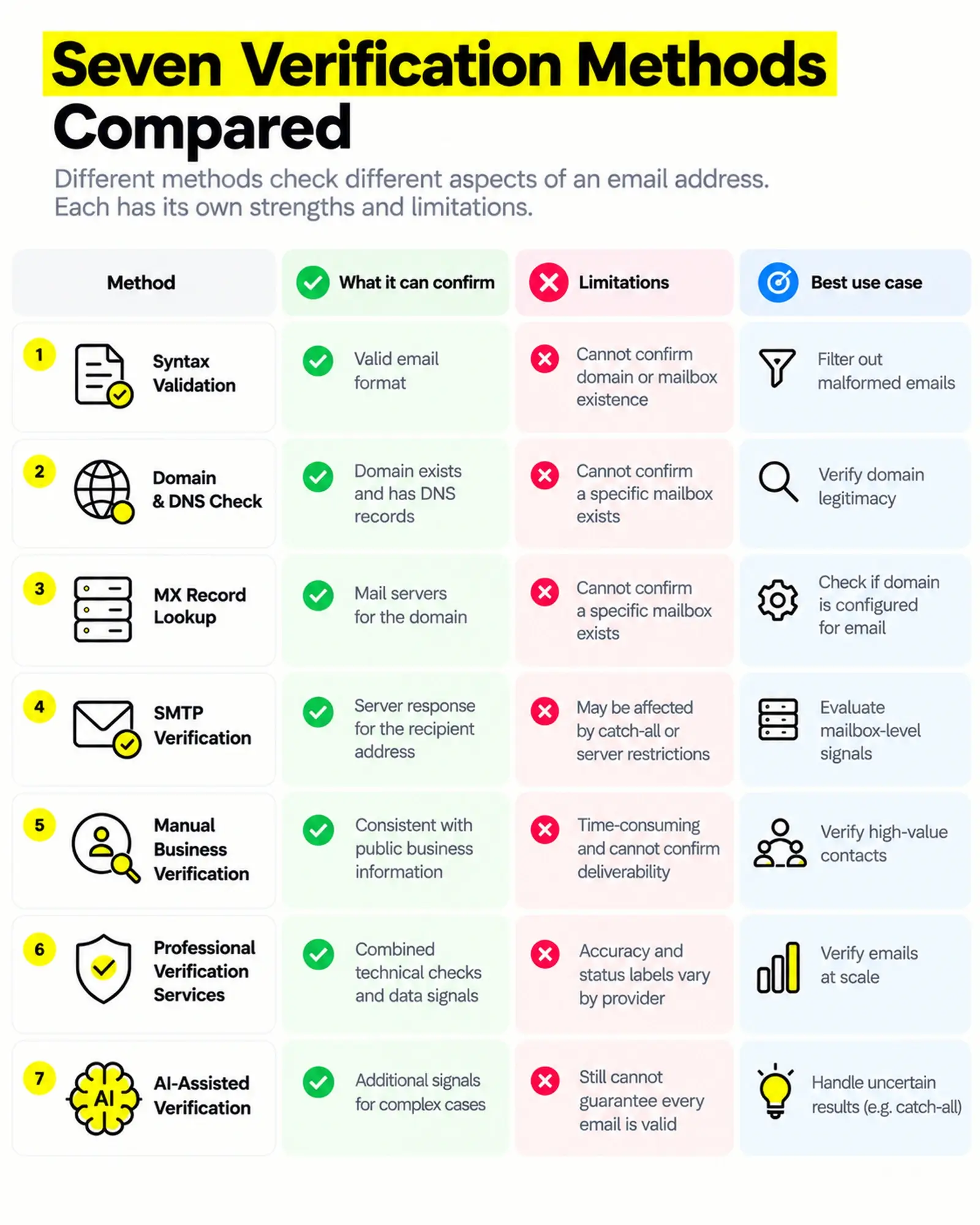
Different verification methods operate at different levels. Some are simple enough to perform manually, while others require specialized infrastructure and advanced data analysis.
Understanding their strengths and limitations helps you choose the right approach.
Email Syntax Validation
Syntax validation checks whether an email address follows an acceptable structural format.
For example:
alex@company.com— Structurally valid- alexcompany.com — Missing the
@symbol - alex
@— Missing the domain - alex
@@company.com — Invalid structure
This is usually the first step in an email verification process.
What it can confirm: The address follows the expected structural rules.
What it cannot confirm: Whether the domain is active, whether the mailbox exists, or whether the email can receive messages.
Syntax validation is useful for identifying obvious data-entry errors, especially when cleaning imported contact lists. However, it provides very limited evidence of actual deliverability.
Domain and DNS Verification
Every business email address contains a domain, such as company.com.
Domain verification checks whether the domain exists and whether its DNS configuration provides relevant information about email handling.
A company may have a functioning website but no working inbound email configuration. Conversely, some businesses use domains specifically for email without hosting a public website.
What it can confirm: Whether the domain has relevant DNS records and appears configured for email-related services.
What it cannot confirm: Whether a particular employee's mailbox exists.
Domain-level checks are especially useful for filtering out misspelled, nonexistent, or improperly configured domains.
However, a legitimate domain is not proof of a legitimate email address.
MX Record Lookup
Mail Exchange (MX) records are DNS records that identify the mail servers responsible for receiving email for a domain.
For example, a business using Google Workspace or Microsoft 365 may publish MX records pointing to its email service provider.
An MX lookup helps determine where incoming email should be routed.
What it can confirm: Which mail servers, if any, are designated to handle incoming email for the domain.
What it cannot confirm: Whether alex@company.com is an active mailbox.
MX records are part of DNS verification, but they deserve special attention because they directly relate to incoming email routing.
Importantly, the absence of MX records does not always prove a domain cannot receive email. Under applicable SMTP rules, a domain may use an address-record fallback unless its configuration explicitly indicates that it does not accept mail.
For this reason, MX checks are a useful signal—not a complete verification method.
SMTP Email Verification
SMTP verification attempts to gather information from a receiving mail server without delivering an actual email message.
In a typical verification interaction, a system may connect to the receiving server and initiate an SMTP conversation to evaluate how it responds to a proposed recipient.
Depending on the server's configuration, the response may indicate that the recipient is accepted, rejected, or cannot be determined.
What it can confirm: How the receiving server responds to a mailbox-level verification attempt.
What it cannot confirm: That the message will ultimately be delivered, accepted after the SMTP conversation, or placed in the recipient's inbox.
SMTP verification is useful, but its limitations are significant.
Many modern mail servers deliberately restrict recipient verification to reduce spam, address harvesting, and automated abuse.
Some accept recipients during initial checks and reject messages later. Others provide temporary or ambiguous responses.
Most importantly, catch-all domains may accept verification requests for addresses that do not actually correspond to individual mailboxes.
This makes SMTP responses valuable evidence, but not definitive proof of mailbox existence.
Manual Business Identity Verification
Manual verification focuses on whether an email address plausibly belongs to the intended business contact.
You might examine:
- The company's official website
- Publicly listed business contact information
- The person's current employer and job title
- Consistent email patterns associated with the organization
- Other reliable, publicly available professional information
For example, if a company commonly uses firstname.lastname@company.com, you might infer a possible address for an employee.
But an inferred email pattern is not the same as a verified mailbox.
What it can confirm: Whether an address is consistent with available business identity information.
What it cannot confirm: Actual mailbox deliverability without additional evidence.
Manual checks are useful for high-value accounts and sensitive outreach, but they become time-consuming when working with hundreds or thousands of prospects.
Professional Email Verification Services
Specialized email verification services combine multiple technical checks to evaluate an address.
Depending on the provider, these may include syntax analysis, domain checks, mail server interactions, risk detection, and additional data-driven signals.
Results are commonly categorized using labels such as Valid, Invalid, Risky, Unknown, or similar statuses.
However, verification services do not all use the same methodology or classification rules.
One provider may classify an uncertain address as risky, while another may return an unknown result.
What they can confirm: A consolidated assessment based on the checks and signals available to the provider.
What they cannot guarantee: Universal accuracy, future deliverability, or inbox placement.
When evaluating a service, look beyond its headline accuracy claim. Consider how it handles uncertainty, how frequently its data is updated, and whether its results are relevant to real B2B outreach.
AI-Assisted Email Verification
AI-assisted verification uses machine learning or other data-driven approaches to interpret additional signals, particularly when conventional checks produce uncertain results.
Rather than relying exclusively on a single SMTP response, an AI-assisted system may evaluate multiple indicators and identify patterns that help distinguish likely deliverable addresses from risky ones.
This approach can be particularly valuable for difficult scenarios, including catch-all domains.
However, AI does not eliminate the fundamental limitations of email verification.
What it can help with: Interpreting complex or inconclusive verification signals and improving classification where traditional checks are insufficient.
What it cannot guarantee: That every address is valid or that every future email will be delivered.
The reliability of any AI-assisted approach depends on its data, methodology, testing, and ongoing performance.
The important question is not simply whether a verification system uses AI, but whether it produces accurate, transparent, and useful results.
How to Verify an Email Address Without Sending an Email
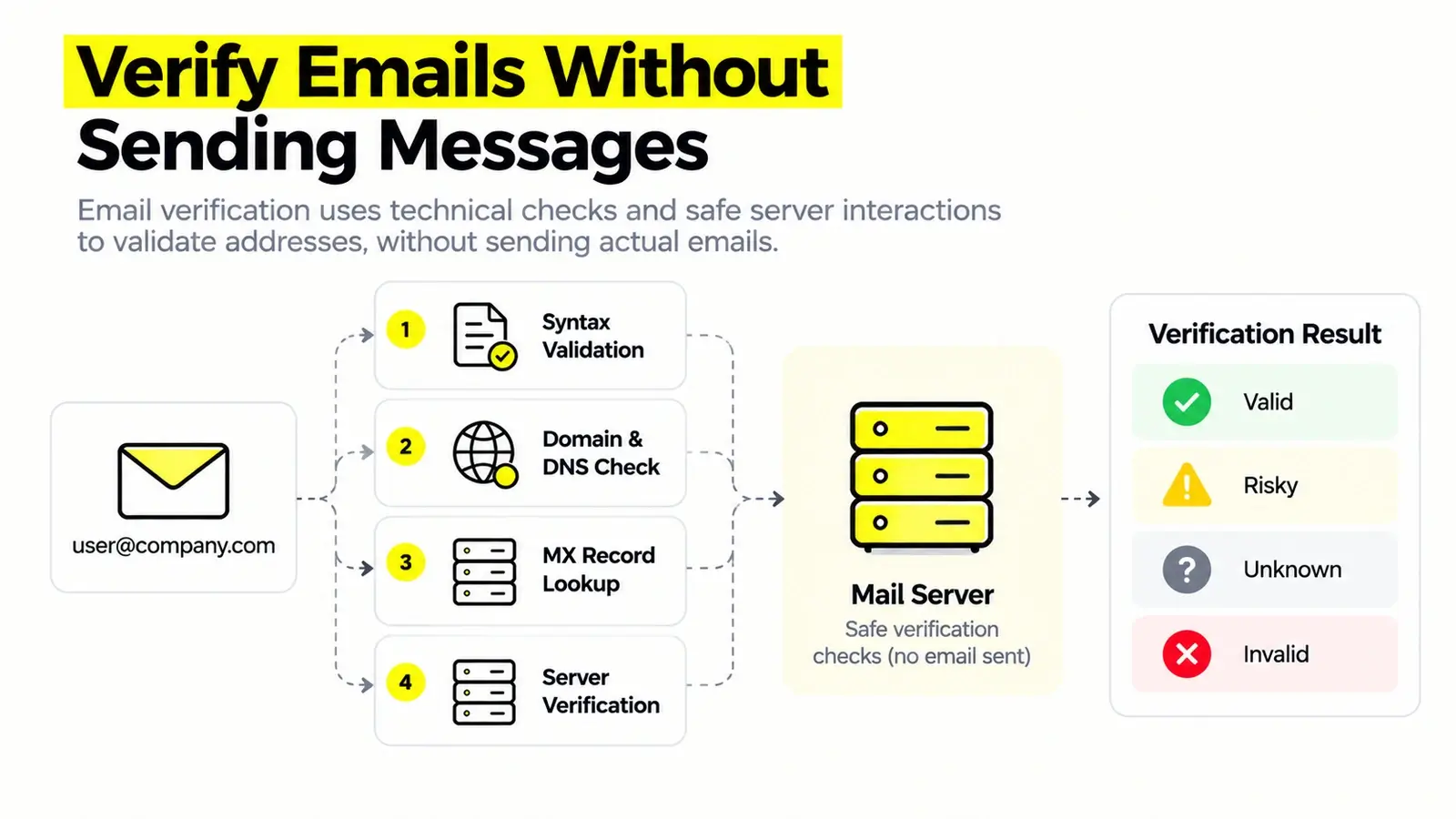
You do not need to send a test message to perform useful email verification.
For an individual business email address, follow this practical workflow.
Step 1: Check the email format.
Look for missing characters, obvious typos, unnecessary spaces, and malformed domain names.
Step 2: Confirm the company domain.
Check whether the domain is associated with the intended business. Do not assume that a similar-looking domain belongs to the same company.
Step 3: Examine the domain's mail configuration.
DNS and MX information can help identify whether the domain is configured to receive email. Remember that MX records alone do not prove mailbox existence.
Step 4: Use a reputable verification service.
A professional service can combine technical signals that are difficult to evaluate manually.
Step 5: Interpret the result carefully.
A Valid result generally indicates stronger deliverability confidence than an uncertain result, but it is not a promise of successful delivery.
Step 6: Confirm the contact's identity when necessary.
For important prospects, verify that the address is associated with the correct person and organization.
This process helps reduce uncertainty without requiring a test email.
Why Email Verification Sometimes Fails
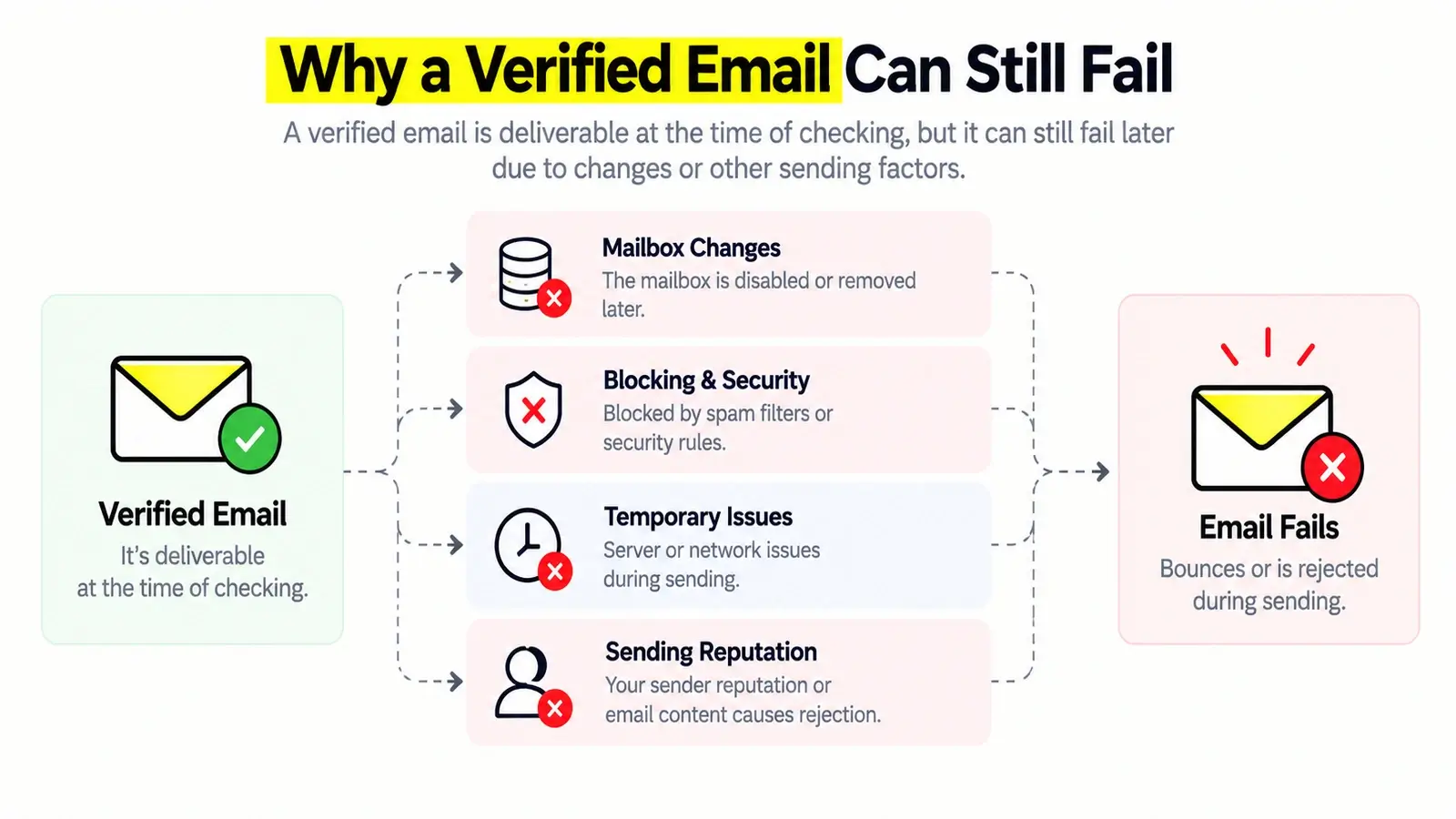
Even sophisticated verification systems encounter situations where an email address cannot be classified with complete confidence.
Several technical and operational factors explain why.
Catch-all Mail Servers
A catch-all domain may accept incoming messages addressed to recipients that do not correspond to explicitly configured individual mailboxes.
For example, the server might initially accept both alex@company.com and random123@company.com.
If both addresses receive similar SMTP responses, traditional recipient checks may be unable to distinguish them reliably.
This is one reason catch-all verification requires more than a simple accepted-or-rejected response.
For a deeper explanation, read our guide: What Is a Catch-all Email? Why It Breaks Email Verification.
Anti-Abuse and SMTP Restrictions
Mail providers often limit automated verification attempts.
A server may reject probing connections, delay responses, or avoid revealing whether a recipient exists.
These behaviors protect email infrastructure but can make mailbox verification inconclusive.
Temporary Server Responses
A mail server may temporarily defer a request because of rate limits, greylisting, maintenance, or other operational conditions.
A temporary failure does not necessarily mean that the address is invalid.
Verification systems need to distinguish permanent rejection from temporary uncertainty.
Outdated Contact Information
Business email data changes continuously.
Employees leave companies, organizations change domains, and mailboxes are disabled or reassigned.
An address verified several months ago may no longer represent an active contact.
This is why data freshness matters alongside the original verification result.
Mailbox Validity Is Not Inbox Placement
A valid mailbox can still receive messages in its spam folder, quarantine system, or other filtered destination.
Sender reputation, authentication, message content, recipient engagement, and organizational filtering policies all affect delivery outcomes.
Email verification evaluates recipient-related signals. It cannot guarantee inbox placement.
Understanding Email Verification Results
Not every verification result should be treated the same way.
Different providers use different labels, but understanding the meaning of each status is essential when building a reliable contact list.
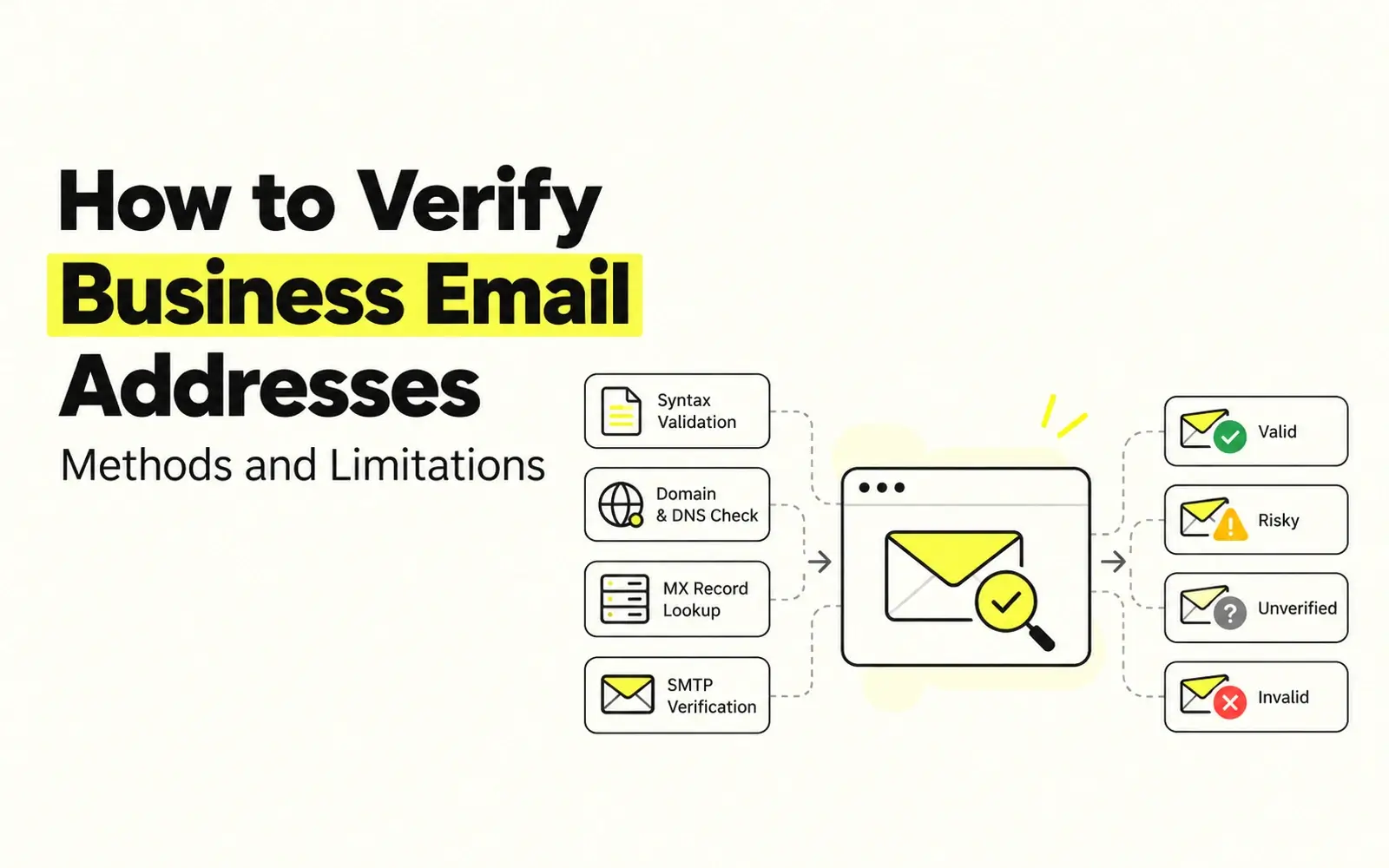
Status | Meaning | Recommended Action |
|---|---|---|
Valid | The email address is verified and is likely deliverable. | Suitable for outreach. |
Unverified | The address has not been verified, or its deliverability remains undetermined. | Verify before outreach. |
Risky | Not recommended to send emails — may bounce. | Avoid or use caution. |
Invalid | The email address is verified and is undeliverable. | Exclude from outreach. |
These classifications help businesses understand email deliverability and make better outreach decisions. However, verification results are not always definitive, especially when dealing with catch-all domains or restrictive mail servers.
Kitmind takes a different approach. Powered by advanced AI email verification technology, Kitmind provides only two statuses: Verified (the email is deliverable) and Unavailable (the email is invalid or no email exists). This gives users greater certainty, allowing them to focus solely on finding prospects with valid email addresses. It helps teams identify the right decision-makers and reach them with confidence—without manually managing complex verification processes.
How to Handle Business Email Verification at Scale
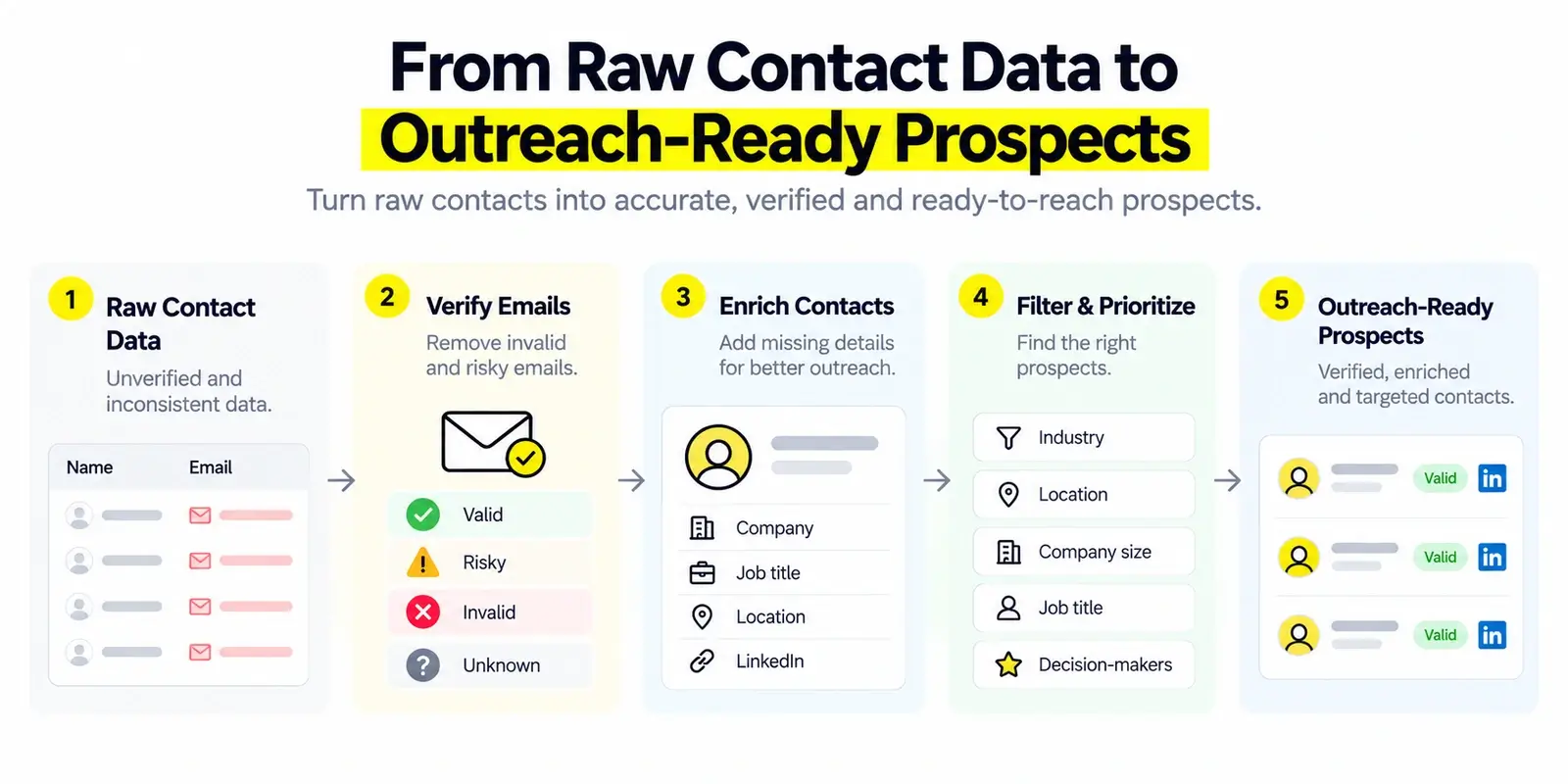
Verifying a single address is relatively straightforward. Maintaining a large and accurate contact database is a different challenge.
As contact lists grow, teams need consistent processes for data quality.
Start by standardizing email fields and removing exact duplicates. Identify incomplete records, outdated contacts, and domains that may no longer be associated with the intended companies.
Next, preserve useful metadata, including the contact's company, role, data source, and verification status.
For records that are uncertain or risky, avoid treating them as equivalent to verified contacts.
If your workflow involves CSV files, distinguish between two related activities:
- Email verification: Evaluating the validity or deliverability of existing email addresses.
- Contact enrichment: Adding missing or updated contact information, potentially including verified business email addresses.
These processes often complement each other, but they are not interchangeable.
For example, Kitmind's CSV Enrichment workflow focuses on enriching contact records with B2B information, including verified business email data, rather than functioning as a standalone bulk email verification tool.
What to Look for in a Business Email Verification Solution
Choosing a verification solution requires more than comparing advertised accuracy percentages.
Consider these factors:
- Verification accuracy: Look for clear explanations of how accuracy is measured and whether claims are supported by meaningful testing.
- Catch-all handling: Determine whether the solution simply labels catch-all addresses as unknown or can provide a more useful assessment.
- Transparent status classifications: A reliable system should distinguish high-confidence results from uncertain or risky addresses.
- Data freshness: Verification results become less useful as contact information ages. Consider how the provider handles changing mailbox and company data.
- Contact and company coverage: For B2B prospecting, verifying an address is only part of the process. You also need to identify the right companies and people.
- Workflow compatibility: Consider whether the data can be used efficiently in your existing prospecting, lead management, and CRM processes.
The best solution is not necessarily the one promising the highest percentage. It is the one that provides dependable evidence, communicates limitations, and fits your business needs.
How Kitmind Helps You Find Verified Business Emails
Traditional prospecting often involves separate steps: finding a company, identifying the right person, guessing or locating an email address, and then checking whether that address is usable.
Kitmind helps bring these activities into a more connected B2B prospecting workflow.
With Kitmind Discover, teams can identify companies relevant to their target market, including businesses that may be difficult to find through LinkedIn-focused research alone.
With Kitmind Prospector, users can search for relevant decision-makers and access business contact information, including verified email addresses.
Kitmind's underlying AI-powered email verification technology supports its contact data quality, including more advanced assessment of difficult catch-all email scenarios.
Users can also work with contact data through supported Chrome Extension scenarios, organize valuable prospects in Leads, and use available integrations to connect prospecting data with downstream tools.
The key benefit is not simply checking whether an email address works.
It is helping teams move from finding the right business to reaching the right person with greater confidence.
Best Practices for Maintaining Accurate Business Email Data
Email verification should be treated as an ongoing data quality process, not a one-time task.
To maintain reliable B2B contact records:
- Use verified contact data whenever possible. Avoid relying exclusively on guessed email patterns.
- Treat uncertain results separately. Risky and unverified addresses should not be handled like confirmed valid contacts.
- Keep contact information current. Job changes and organizational updates can quickly make previously useful records obsolete.
- Verify the person-company relationship. A deliverable address is not automatically the correct contact for your target account.
- Maintain organized lead records. Clear ownership, accurate fields, and consistent data management reduce duplicated effort.
- Review bounce patterns. Unexpected increases may indicate stale data, verification limitations, or broader sending issues.
These practices improve the reliability of your prospecting data while helping teams make better outreach decisions.
Frequently Asked Questions
Can you verify a business email without sending a message?
Yes. Syntax checks, DNS analysis, mail server interactions, and specialized verification services can provide useful signals without sending a test email to the recipient. However, these methods cannot guarantee that a future message will be successfully delivered or placed in the inbox.
Does an MX record mean an email address is valid?
No. An MX record identifies mail servers designated to receive messages for a domain. It does not confirm whether a specific mailbox exists. A domain can have correctly configured MX records while individual addresses remain invalid or inactive.
How accurate is SMTP email verification?
SMTP verification can provide valuable recipient-level signals, but accuracy depends on how the receiving server responds. Catch-all configurations, anti-abuse restrictions, temporary failures, and delayed recipient rejection can all limit the reliability of a simple SMTP check.
Can catch-all email addresses be verified?
Yes. Catch-all emails can be verified using advanced AI-powered email verification technology. While traditional SMTP checks often cannot confirm whether an individual catch-all mailbox exists, Kitmind uses AI verification algorithms to verify email validity beyond these limitations. Users can find verified catch-all contacts directly in Kitmind Discover and Prospector.
Is a valid email guaranteed to reach the inbox?
No. A valid email address may be capable of receiving messages, but inbox placement depends on additional factors, including sender reputation, authentication, filtering policies, and message quality. Verification and inbox deliverability are related but distinct concepts.
How often should business email addresses be verified?
There is no universal interval suitable for every contact database. Reverification frequency should depend on data age, source reliability, recent job changes, outreach activity, and observed bounce patterns. Higher-risk or older records may require more frequent review.
Conclusion
Business email verification is more complex than checking whether an address looks correct.
Syntax validation, DNS and MX checks, SMTP interactions, manual research, professional verification services, and AI-assisted approaches all provide useful information—but each has limitations.
The most reliable approach combines multiple signals, distinguishes uncertain results from verified addresses, and keeps business contact information up to date.
For B2B prospecting teams, the goal is not merely to collect more email addresses. It is to identify relevant decision-makers and obtain reliable contact information that supports more effective outreach.
Find better prospects and access verified business emails with Kitmind.